Essa tradução foi gerada por um programa e ainda não foi revisada por uma pessoa. Falas essa língua? Dá uma olhada.
Introdução
O Honda Civic 2016 utiliza um controle remoto sem chave para ligar o motor, além do mecanismo normal de trava/destrava. Sem a bateria, o carro não pode ser ligado. Este guia mostra como substituir a bateria de lítio dentro do controle remoto sem chave do Honda Civic 2016.
O que você precisa
-
-
-
Certifique-se de ter a bateria de reposição pronta. Você precisará de 1 unidade de bateria de lítio CR 2032.
-
Remova a chave metálica deslizando o interruptor na parte traseira do controle remoto e puxando a chave para fora.
 Pergunte ao FixBot
-
-
-
Após remover a chave, você verá duas barras de plástico. Este é o local onde você pode abrir o controle.
-
O fabricante recomendou usar uma moeda, mas qualquer ferramenta rígida ou até mesmo a própria chave funcionará.
-
O fabricante recomendou usar um pano cobrindo a moeda ou ferramenta para evitar que ela risque as barras de plástico.
-
-
-
-
Agora você pode abrir cuidadosamente com uma espátula
-
Remova a bateria antiga pelo lado esquerdo.
-
Lembre-se de que o lado + da bateria deve estar voltado para cima.
-
-
-
Insira uma bateria CR 2032 nova começando pelo lado direito e, em seguida, pressione a bateria para baixo. Ela deve fazer um som de "clique" audível.
-
Novamente, certifique-se de que o lado + da bateria esteja voltado para cima.
-
-


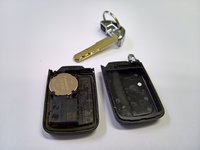
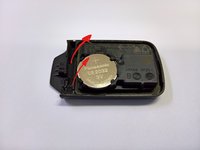
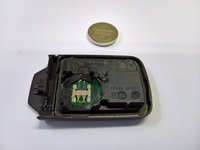


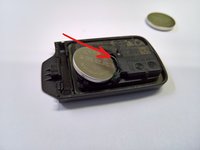

Para a remontagem de seu dispositivo, siga estas instruções na ordem inversa.
Cancelar: não concluí este guia.
18 outras pessoas executaram este guia.

Equipe

1Comentário do guia
Super Anleitung mit sehr guten Fotos - vielen Dank!
