Ir para o conteúdo principal
Participe da comunidade de reparos - Criar conta

Hard Drive Replacement Guide

O que você precisa

  1. Hard Drive Replacement Guide, Hard Drive: passo 1, imagem 1 %32
    • Use a Phillips #0 screwdriver to loosen the screws.

    • The screws are designed to remain in the panel.

  2. Hard Drive Replacement Guide: passo 2, imagem 1 %32 Hard Drive Replacement Guide: passo 2, imagem 2 %32 Hard Drive Replacement Guide: passo 2, imagem 3 %32
    • To open the panel, use a plastic opening tool or your finger.

    • If there is difficulty opening the panel, than the screws may not be lose enough.

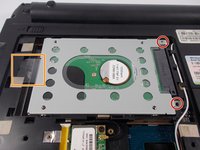
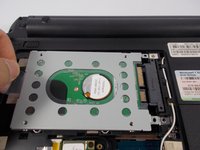
  3. Hard Drive Replacement Guide: passo 3, imagem 1 %32 Hard Drive Replacement Guide: passo 3, imagem 2 %32
    • Use the Phillips #0 screwdriver to unscrew the two 5mm screws.

    • Remove the hard drive by using your fingers to pull firmly on the clear tab.

  4. Hard Drive Replacement Guide: passo 4, imagem 1 %32
    • You have successfully removed the hard drive from the laptop.

Conclusão

To reassemble your device, follow these instructions in reverse order.

Steven Park

Membro desde: 03/09/16

420 Reputação

Autoria de 3 guias

Equipe

0Comentários do guia

Comentar

Visualizações:

Últimas 24 horas: 2

Últimos 7 dias: 7

Últimos 30 dias: 23

Ao todo: 896