Essa tradução foi gerada por um programa e ainda não foi revisada por uma pessoa. Falas essa língua? Dá uma olhada.
Introdução
Com o tempo, a bateria do seu HTC SMT 6175 pode começar a perder a capacidade de manter a carga ou deixar de alimentar o dispositivo, o que é comum em celulares mais antigos. No entanto, a substituição da bateria pode restaurar o desempenho normal e prolongar a vida útil do celular, sem a necessidade de uma substituição completa.
Não são necessárias ferramentas especiais ou habilidades técnicas para este processo. É uma substituição simples que envolve apenas a remoção da capa traseira e a troca da bateria antiga. Certifique-se de desligar o celular antes de começar para evitar qualquer curto-circuito ou danos aos componentes internos.
-
-
-
Primeiro, vire o celular para que a parte traseira fique voltada para cima.
 Pergunte ao FixBot
-
-
-
-
Com ambos os polegares, empurre a parte traseira do exterior do celular para cima e remova a face frontal do aparelho.
-
-
-
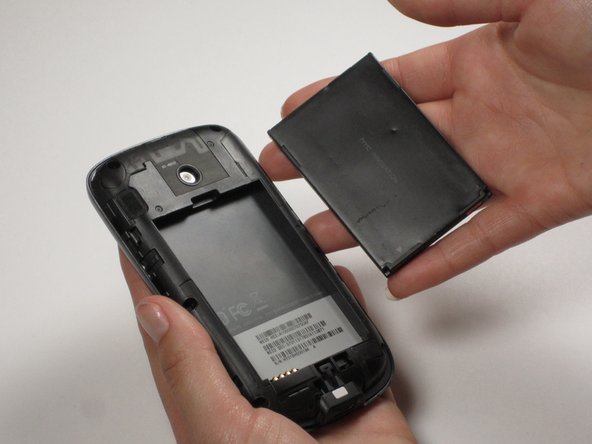
Insira o dedo ou uma espátula na ranhura acima da bateria. Remova-a e reserve.
-
-



Para a remontagem de seu dispositivo, siga estas instruções na ordem inversa.

Equipe

Cal Poly, Team 25-29, Garner Spring 2011 Membro de Cal Poly, Team 25-29, Garner Spring 2011
CPSU-GARNER-S11S25G29
3 Membros
Autoria de 60 guias
