Introdução
You may need to replace the battery for multiple reasons; for example, you may have over charged it which makes it more likely to not work. This guide will show you how to replace the defective battery.
O que você precisa
-
-
Flip your phone over and hold the phone with the back facing you.
 Pergunte ao FixBot
-
-
-
-
Place the prying tool into the notch at the bottom of the case and pull up to remove.
-
-
-
Use the plastic prying tool in the upper left-hand corner notch of the battery to remove.
-


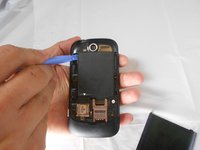
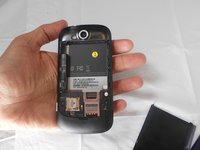
To reassemble your device, follow these instructions in reverse order.
Cancelar: não concluí este guia.
Uma outra pessoa concluiu este guia.

Equipe

USF Tampa, Team 16-5, Watkins Spring 2014 Membro de USF Tampa, Team 16-5, Watkins Spring 2014
USFT-WATKINS-S14S16G5
2 Membros
Autoria de 10 guias
