Ir para o conteúdo principal
Participe da comunidade de reparos - Criar conta

HP ProOne 600 G1 Fan Replacement

O que você precisa

  1. HP ProOne 600 G1 Fan Replacement, Back Removal: passo 1, imagem 1 %32 HP ProOne 600 G1 Fan Replacement, Back Removal: passo 1, imagem 2 %32
    • Push the unlock tabs on the back of the monitor in and towards each other while sliding the back cover up.

    Pergunte ao FixBot
  2. HP ProOne 600 G1 Fan Replacement: passo 2, imagem 1 %32 HP ProOne 600 G1 Fan Replacement: passo 2, imagem 2 %32
    • Loosen the two 1/2" screws , with the T15 Torx Screwdriver, on each side of the stand. Remove stand.

    Pergunte ao FixBot
  3. HP ProOne 600 G1 Fan Replacement: passo 3, imagem 1 %32
    • Take out the single 3/8" screw, with the T15 Torx Screwdriver, from the middle of the backplate.

    Pergunte ao FixBot
  4. HP ProOne 600 G1 Fan Replacement: passo 4, imagem 1 %32
    • Remove the backplate by pulling it back towards you.

    • Small plastic tabs hold in the backplate, pull these up to remove it.

    Pergunte ao FixBot
  5. HP ProOne 600 G1 Fan Replacement, Fan: passo 5, imagem 1 %32 HP ProOne 600 G1 Fan Replacement, Fan: passo 5, imagem 2 %32 HP ProOne 600 G1 Fan Replacement, Fan: passo 5, imagem 3 %32
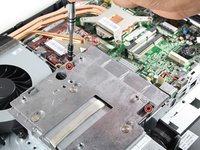
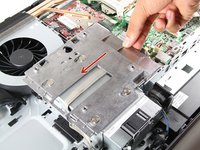
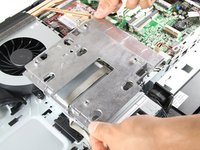
    • Remove both 3/8" screws using the T15 Torx Screwdriver from the metal plate, and slide the plate to the left.

    Pergunte ao FixBot
  6. HP ProOne 600 G1 Fan Replacement: passo 6, imagem 1 %32 HP ProOne 600 G1 Fan Replacement: passo 6, imagem 2 %32 HP ProOne 600 G1 Fan Replacement: passo 6, imagem 3 %32
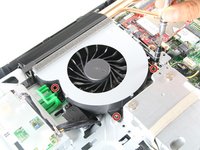
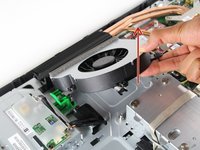
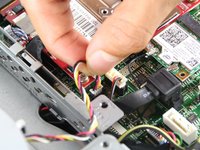
    • Unscrew three surrounding 1/4" screws, with the T15 Torx Screwdriver. Pull out the fan and attached wires.

    Pergunte ao FixBot
Conclusão

To reassemble your device, follow these instructions in reverse order.

Victor Chacon

Membro desde: 10/01/15

116 Reputação

Autoria de 1 guia

Equipe

Cal Poly, Team 1-20, Maness Fall 2015 Membro de Cal Poly, Team 1-20, Maness Fall 2015

CPSU-MANESS-F15S1G20

4 Membros

Autoria de 12 guias

0Comentários do guia

Comentar

Visualizações:

Últimas 24 horas: 4

Últimos 7 dias: 11

Últimos 30 dias: 89

Ao todo: 2,538