Essa tradução foi gerada por um programa e ainda não foi revisada por uma pessoa. Falas essa língua? Dá uma olhada.
Introdução
Um tapete refletor de documentos danificado pode produzir imagens de baixa qualidade. Você pode substituir este tapete em poucos passos simples.
O que você precisa
-
-
-
Segure a tampa do scanner pela parte frontal do dispositivo e levante-a completamente até que ela permaneça aberta sozinha.
 Pergunte ao FixBot
-
-
-
Com as duas mãos, segure a tampa pelos dois lados, perto das dobradiças, e levante-a para cima para soltá-la de cada uma delas.
-
-
-
-
-
-
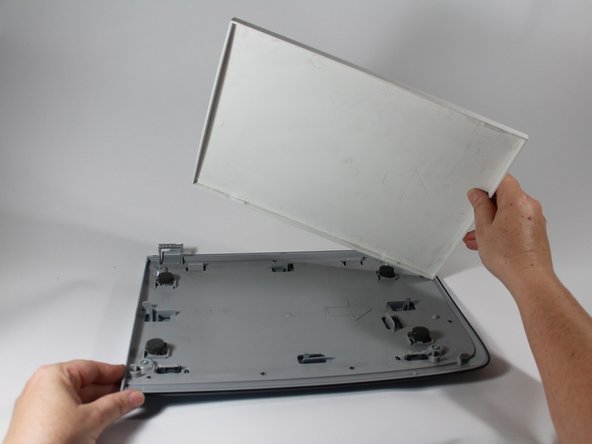
Depois de remover a tampa, coloque-a sobre uma superfície plana com o tapete branco virado para cima.
-
Com a ponta chata de uma espátula de plástico, force o tapete para fora em um dos cantos frontais. Repita o procedimento no outro canto frontal.
-
-
-
Assim que ambos os cantos frontais forem liberados dos clipes de plástico, o restante da esteira deve se soltar facilmente.
-
Recicle ou descarte a esteira danificada.
-
-


Para a remontagem de seu dispositivo, siga estas instruções na ordem inversa.

Equipe

New Mexico State, Team 1-4, Sheppard Spring 2014 Membro de New Mexico State, Team 1-4, Sheppard Spring 2014
NMSU-SHEPPARD-S14S1G4
3 Membros
Autoria de 48 guias
2Comentários do guia
Would a piece of poster board work for a reflective mat?
I don’t think poster board would work because I don’t think it’s reflective enough.
