Introdução
Overtime the CMOS Battery may drain and need replacement. This can cause a reset in the System Clock and other features of the Mini 210-1199x. In order to fix this, a battery replacement is needed.
Replace the CMOS Battery with a 3-volt 2032-size coin battery.
O que você precisa
-
-
Unplug the netbook.
-
Secure the netbook in a upright position.
-
Slide the plastic battery latch that secures it into the netbook.
-
Keep thumb secure on the right tab as you begin to remove the battery.
 Pergunte ao FixBot
-
-
-
Press down on the two orange buttons to release.
-
If the case does not pop off, begin to use Spudger to pry the case off the back.
-
-
-
-
Place the spudger on corners and openings in order to begin removal of the back.
-
Continue this on all corner until the case comes fully off of the back.
-
-
Ferramenta utilizada neste passo:Tweezers$4.99
-
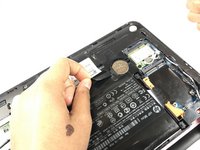
Simply pull the small black ribbon off of the battery with either your finger or a pair of tweezers.
-
-
-
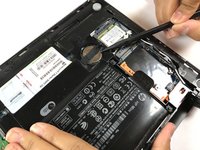
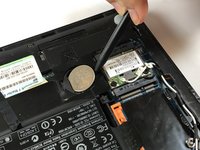
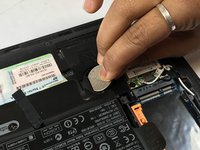
Using the spudger, carefully pop the battery out of the right side as seen in the picture.
-









To reassemble your device, follow these instructions in reverse order.

Equipe

Texas Tech, Team S46-G3, Bennett Spring 2017 Membro de Texas Tech, Team S46-G3, Bennett Spring 2017
TTU-BENNETT-S17S46G3
3 Membros
Autoria de 6 guias
