Introdução
If the hard drive makes scratching or whining noises, or if the operating system does not boot due to a disk read error, you may need to replace it.
The hard drive contains operating system files and your personal files. If you intend to replace the hard drive, save any personal files you need later onto an alternative media source before completing these steps. You will need to install an operating system on the new hard drive once the new hard drive is installed on the netbook.
O que você precisa
-
-
-
Hold the netbook top-side down with the lid closed.
-
Slide the plastic battery release latches towards the lock symbols.
 Pergunte ao FixBot
-
-
-
-
-
Turn the netbook to view its edge.
-
Press both orange eject buttons simultaneously, and use a spudger to pry off the back case.
-
-
-
-
-
Ferramenta utilizada neste passo:Tweezers$4.99
-
Peel back the black sticker covering the hard drive with tweezers or your fingers.
-
-
-
Use a plastic opening tool to carefully disconnect the hard drive connector found above the RAM slot.
-
-
-
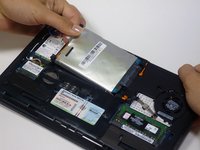
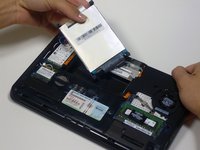
Pull the silver plastic tab up and remove the hard drive. The tab may also be black.
-
-


To reassemble your device, follow these instructions in reverse order.
Cancelar: não concluí este guia.
14 outras pessoas executaram este guia.

Equipe

Cal Poly, Team 9-17, Amido Fall 2012 Membro de Cal Poly, Team 9-17, Amido Fall 2012
CPSU-AMIDO-F12S9G17
3 Membros
Autoria de 8 guias
1Comentário do guia
Be aware that some models don't have buttons but a orange switch that need some pressure to release the cover
