Ir para o conteúdo principal
Participe da comunidade de reparos - Criar conta

HP G62-223CL Wireless Card Replacement

O que você precisa

    1. HP G62-223CL Wireless Card Replacement, Battery Removal: passo 1, imagem 1 %32 HP G62-223CL Wireless Card Replacement, Battery Removal: passo 1, imagem 2 %32
      • Removing the battery while the laptop is still on may corrupt your files.

      • Turn the device over to expose the bottom of the device.

      • Slide the battery release all the way to the left.

      • There will be a click and the battery will be released from its compartment.

      Pergunte ao FixBot

      Comentar

    2. HP G62-223CL Wireless Card Replacement: passo 2, imagem 1 %32
      • Carefully remove the battery from its compartment.

      Pergunte ao FixBot

      Comentar

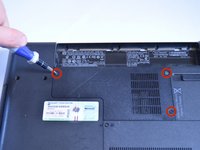
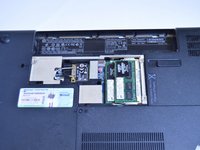
    1. HP G62-223CL Wireless Card Replacement, Wireless Card: passo 3, imagem 1 %32 HP G62-223CL Wireless Card Replacement, Wireless Card: passo 3, imagem 2 %32
      • Locate three Phillips head retaining screws which secure the compartment.

      • Use a Phillips #0 screwdriver to loosen the retaining screws.

      • Remove the panel covering the compartment.

      • Ground yourself before attempting to touch any components. To ground yourself, touch a conductive metal to eliminate any static buildup in your body, which can damage computer components.

      Pergunte ao FixBot

      Comentar

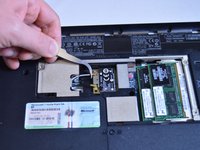
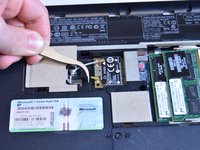
    2. HP G62-223CL Wireless Card Replacement: passo 4, imagem 1 %32 HP G62-223CL Wireless Card Replacement: passo 4, imagem 2 %32 HP G62-223CL Wireless Card Replacement: passo 4, imagem 3 %32
      Ferramenta utilizada neste passo:
      Tweezers
      $4.99
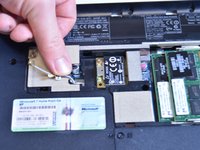
      • Use tweezers to disconnect the gray cable and the black cable from the wireless card.

      Pergunte ao FixBot

      Comentar

    3. HP G62-223CL Wireless Card Replacement: passo 5, imagem 1 %32
      • Use a Phillips #0 screwdriver to remove the single 4mm screw from the corner of the wireless card.

      Pergunte ao FixBot

      Comentar

    4. HP G62-223CL Wireless Card Replacement: passo 6, imagem 1 %32
      • Carefully lift and pull wireless card. It is removed!

      Pergunte ao FixBot

      Comentar

Conclusão

To reassemble your device, follow these instructions in reverse order.

Cancelar: não concluí este guia.

Equipe

USF Tampa, Team 1-4, Sullivan Winter 2015 Membro de USF Tampa, Team 1-4, Sullivan Winter 2015

USFT-SULLIVAN-W15S1G4

4 Membros

Autoria de 15 guias

0Comentários do guia

Comentar

Visualizações:

Últimas 24 horas: 0

Últimos 7 dias: 3

Últimos 30 dias: 17

Ao todo: 1,449