Ir para o conteúdo principal
Participe da comunidade de reparos - Criar conta

HP Compaq 6710b Wireless Card Replacement

O que você precisa

  1. HP Compaq 6710b Wireless Card Replacement, Battery: passo 1, imagem 1 %32
    • Turn off your computer! Taking out the battery while it's still on is dangerous!

    • Flip the laptop over to the back.

    • Using two hands, push on the tabs while gently taking out the battery.

    Pergunte ao FixBot
  2. HP Compaq 6710b Wireless Card Replacement, Wireless Card: passo 2, imagem 1 %32 HP Compaq 6710b Wireless Card Replacement, Wireless Card: passo 2, imagem 2 %32
    • Make sure the computer is off.

    • Using a Phillips #1, unscrew the 5mm screw on the bottom of the laptop

    • Remove the back cover plate.

    • The cover has popping tabs so it might require a small amount of force to remove.

    Pergunte ao FixBot
  3. HP Compaq 6710b Wireless Card Replacement: passo 3, imagem 1 %32 HP Compaq 6710b Wireless Card Replacement: passo 3, imagem 2 %32
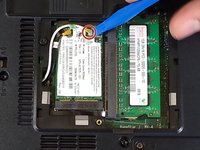
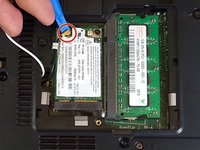
    • Using a blue plastic prying tool, gently pry off the 2 connectors.

    • The black cable goes on the connection closer to where the cables originate, while the white cable goes on the farther connection.

    Pergunte ao FixBot
  4. HP Compaq 6710b Wireless Card Replacement: passo 4, imagem 1 %32 HP Compaq 6710b Wireless Card Replacement: passo 4, imagem 2 %32
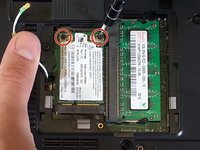
    • Using the Phillips #1 screwdriver, unscrew the 2 3mm screws.

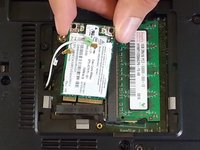
    • Adaptor is spring-loaded.

    • You can now take out the adaptor.

    Pergunte ao FixBot
Conclusão

To reassemble your device, follow these instructions in reverse order.

3 outras pessoas executaram este guia.

Khulan Orgil

Membro desde: 04/14/15

1.186 Reputação

Autoria de 6 guias

Equipe

Cal Poly, Team 4-2, Maness Spring 2015 Membro de Cal Poly, Team 4-2, Maness Spring 2015

CPSU-MANESS-S15S4G2

4 Membros

Autoria de 6 guias

0Comentários do guia

Comentar

Visualizações:

Últimas 24 horas: 1

Últimos 7 dias: 5

Últimos 30 dias: 66

Ao todo: 3,013