Introdução
The Random Access Memory (RAM) module is one of the more common components of a computer to fail and need replacement. The RAM is used by the CPU to store information that it will need to retrieve quickly or often. Nothing is permanently stored on the RAM module so you will not lose any data after the replacement. RAM modules are "plug and play" components which means that they can be removed and replaced very easily. The tricky part is getting to them inside the computer. The replacement RAM module should be left in the package until it is ready to be installed as any foreign material that gets on or in the RAM module may affect the performance of the component If your computer is running slowly and commonly used apps and functions are showing error messages this guide will help you replace the RAM module and fix the issue.
O que você precisa
-
-
-
With the laptop upside down, remove the battery by hand and the twelve 7.0 mm screws that are holding the back case to the front. Use a JIS #0 screwdriver to remove the screws.
 Pergunte ao FixBot
-
-
-
Peel back the rubber footrests located next to the battery, on the left and right sides.
-
Remove the two 7.0 mm screws underneath the rubber feet using a JIS #0 screwdriver.
-
-
-
-
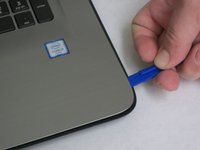
Flip the computer over and use a plastic opening tool to wedge between the back and front cases.
-
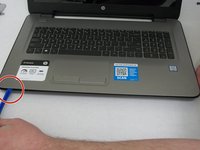
Trace the perimeter of the laptop. Make sure to keep the tool inserted between the front and back cases. You will hear popping sounds as the back case becomes disengaged from the front plate.
-
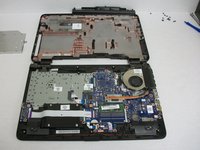
Flip the laptop over and lift the back case off. Now you have access to all of the internal hardware.
-
-
-
-
-
Locate the RAM module.
-
Locate the metal clips on either side of the RAM module.
-
-
-
Using your finger, pry the metal clip from both sides of the RAM module and the module will "pop" up.
-
-




To reassemble your device, follow these instructions in reverse order.
Cancelar: não concluí este guia.
Uma outra pessoa concluiu este guia.

Equipe

Washington State, Team S1-G1, Lobnitz Spring 2018 Membro de Washington State, Team S1-G1, Lobnitz Spring 2018
WSU-LOBNITZ-S18S1G1
5 Membros
Autoria de 35 guias
