O que você precisa
-
-
-
Eject the battery from the computer by sliding the two clips on the bottom of the computer toward the center of the computer.
-
Slide the battery out as shown in the picture.
 Pergunte ao FixBot
-
-
-
-
-
-
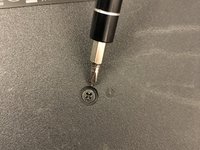
Using a Phillips #1 screwdriver, remove the small screw next to the disc engraving shown in the picture.
-
-



Conclusão
To reassemble your device, follow these instructions in reverse order.

Equipe

Washington State, Team S2-G3, Lobnitz Spring 2018 Membro de Washington State, Team S2-G3, Lobnitz Spring 2018
WSU-LOBNITZ-S18S2G3
8 Membros
Autoria de 56 guias
