O que você precisa
-
-
-
Insert the flat tip of the metal spudger into the seam between the back panel and the screen.
-
Slide the spudger across the perimeter of the device and gently pry apart at each corner.
-
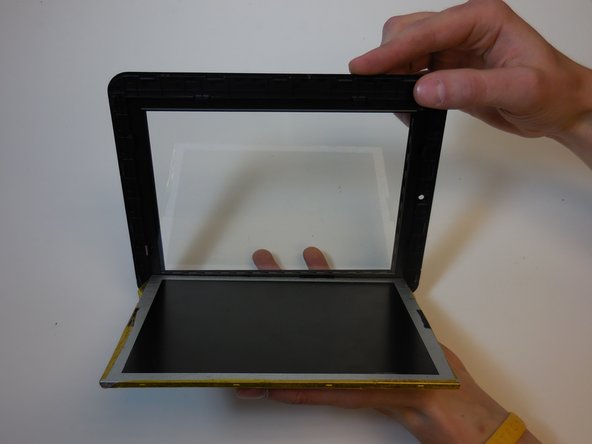
After the pressure clamps are released orient the device so that the speaker is to the right and the screen is tilted away from you.
 Pergunte ao FixBot
-
-
-
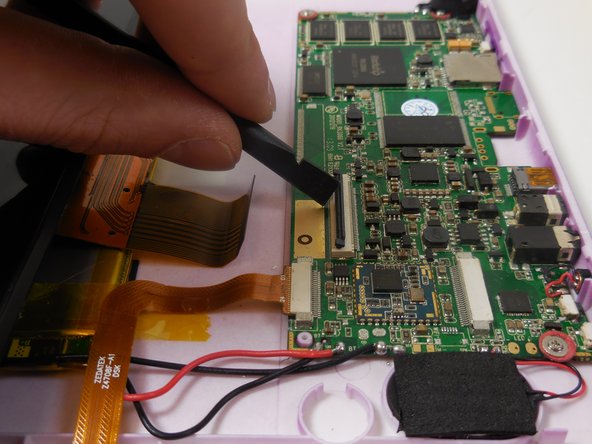
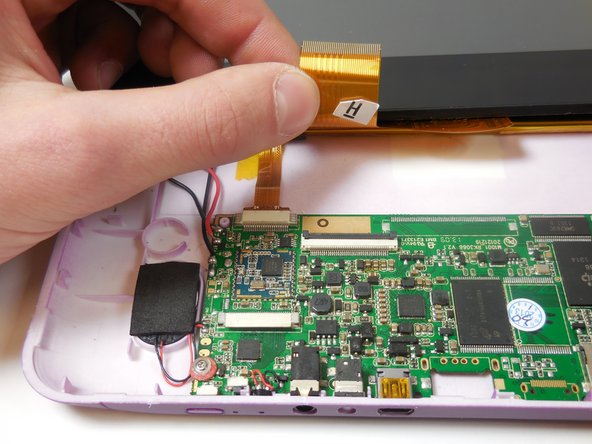
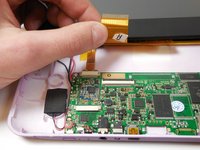
Locate the shorter ribbon cable and the black pressure tabs that hold the ribbon cable in place.
-
Use the plastic spudger to gently slide the tabs about 2mm away from connector.
-
-
-
-
Locate the longer ribbon cable and the pressure clamp that holds the cable in the connection port.
-
Using the plastic spudger, flip the black locking clip up.
-
Once the clip is unlocked, the cable should slide out without resistance
-
-
-
-
-
Insert the flat tip of a metal spudger into the seam between the back panel and the screen.
-
The easiest place to start is at one of the corners.
-
Caution: When separating the screen from the back panel, two ribbon cables connect the front and back halves of the device. Do not pull the halves apart until the cables are safely disconnected.
-
Once the clamps are released, orient the device so that the speaker is on the right and the screen tilts away from you.
-
-
-
Position the tablet so the camera is on the right and the external buttons are at the top.
-
Locate the shorter ribbon cable and the black locking tabs that secure it.
-
With a plastic spudger, gently slide each black tab about 2 mm away from its connector to unlock it.
-
When the tabs are released, the ribbon cable should lift out of the port without resistance.
-
-




To reassemble your device, follow these steps in reverse order. Ensure all ribbon cables are firmly re-connected before closing the back panel.
Cancelar: não concluí este guia.
Uma outra pessoa concluiu este guia.

Equipe

Colorado Springs, Team 5-2, Panko Spring 2015 Membro de Colorado Springs, Team 5-2, Panko Spring 2015
UCCS-PANKO-S15S5G2
3 Membros
Autoria de 8 guias
