Introdução
Das Kameraglas meines Pixel 7 ist zersplittert. Es scheint ein typisches Problem des Pixel7 zu sein. Die Kameras und die Sensoren sind noch intakt. Leider verweigert Google bisher die Reparatur und gibt auch keine Tipps. Google bietet leider keine Reparatur des Glases an. Die einzige Möglichkeit ist die Reparatur der gesamten Rückseite für 213 €. Zum Glück gibt es jedoch passende Schutzgläser zu kaufen die passgenau zugeschnitten sind.
-
-
-
Entferne das kaputte Glas vorsichtig mit einem Cutter Messer
-
Reinige die Linsen vorsichtig mit einem Mikrofaser Tuch. Vorsicht mit eventuell vorhandenen Glassplittern.
-
-
-
-
Diesen Schritt würde ich inzwischen weglassen, da das Zusatzglas aufgrund des Klebers zu viel Probleme macht und das Bild trübt. Lege das zugeschnittene Schutzglas mit der Klebeschicht nach oben ein (wenn die Klebeschicht zur Kamera zeigt ist das Bild leider verschwommen).
-
-
-
Setze ein vollflächiges Schutzglas auf. Achte darauf, dass sich kein Staub zwischen den Gläsern sammelt.
-

 Pergunte ao FixBot


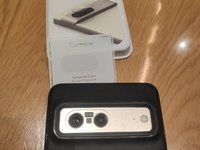
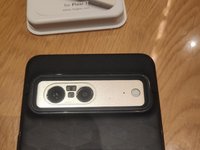

Arbeite die Schritte in umgekehrter Reihenfolge ab, um dein Gerät wieder zusammenzubauen.
Cancelar: não concluí este guia.
16 outras pessoas executaram este guia.

12Comentários do guia
Moin, könntest du mir nen link zukommen lassen wo du das Kameraglas her hast?
Hi, beide Gläser sind von Amazon, leider ist das untere, passende Glas momentan nicht lieferbar. Zudem habe ich leider feststellen müssen, dass die Klebeschicht die Qualität negativ beeinflusst. Ich versuche aktuell die Schicht zu entfernen, habe aber noch kein geeignetes Mittel gefunden.
I did find a link on Amazon (Canadian one) that had the actual lense. It also states in the ad that it doesn't involve taking apart my phone, just do what you did in a sense. I'll post the link for you to check it out if you can and would like to. I'll update you on how it goes for me.
It is a big issues. I am also facing same problem I can't replace it because in my country there is no pixel store .
So are you saying that I take the oval glass and place it adhesive up (not down, adhering it to the phone) and then cover with a larger rear screen protector, such that the adhesive holds the oval glass to the inside of the larger screen protector?
I have tried replacing the oval glass by itself with the adhesive down to hold the oval glass to the phone without the larger rear screen protector and the lens will not focus on distance items, i.e. appear blurry as you indicate.
