Ir para o conteúdo principal
Participe da comunidade de reparos - Criar conta

GoPro Hero3+ Black Edition Camera Lens Replacement

O que você precisa

    1. GoPro Hero3+ Black Edition Camera Lens Replacement, Battery: passo 1, imagem 1 %32
      • Pull the tab on the back of the device to release the back cover. It should come right off.

      • The device pictured does not include the back cover.

      Pergunte ao FixBot

      Comentar

    2. GoPro Hero3+ Black Edition Camera Lens Replacement: passo 2, imagem 1 %32
      • Use the battery tab to pull the battery out of the device.

      Pergunte ao FixBot

      Comentar

      • Remove the battery from the slot.

      Pergunte ao FixBot

      Comentar

    1. GoPro Hero3+ Black Edition Camera Lens Replacement, Front Face Plate: passo 4, imagem 1 %32 GoPro Hero3+ Black Edition Camera Lens Replacement, Front Face Plate: passo 4, imagem 2 %32
      • Using a plastic opening tool, pry the gray, front face plate until it can be removed from the housing.

      • To avoid breaking or weakening the tabs on the face plate which hold it in place, alternate the sides from which you pry and check each tab before separating the plate from the body.

      Pergunte ao FixBot

      Comentar

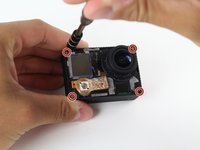
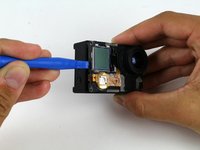
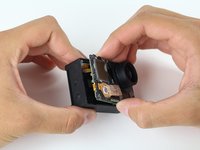
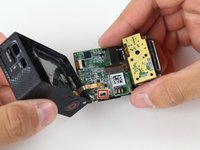
    1. GoPro Hero3+ Black Edition Camera Lens Replacement, Image Sensor: passo 5, imagem 1 %32 GoPro Hero3+ Black Edition Camera Lens Replacement, Image Sensor: passo 5, imagem 2 %32 GoPro Hero3+ Black Edition Camera Lens Replacement, Image Sensor: passo 5, imagem 3 %32
      • Using your screwdriver, remove the four 8.1mm PH00 screws securing the motherboard to the black housing unit and set them aside.

      • Use the plastic opening tool to help pry the motherboard/midframe up from the main housing. Once you can get a hold of the edge, simply pull the internal components up and out!

      • Watch out for the ribbon cable connecting the midframe and the motherboard to the GoPro housing. See the next step.

      Pergunte ao FixBot

      Comentar

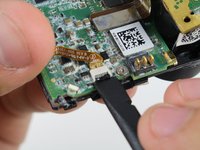
    2. GoPro Hero3+ Black Edition Camera Lens Replacement: passo 6, imagem 1 %32 GoPro Hero3+ Black Edition Camera Lens Replacement: passo 6, imagem 2 %32
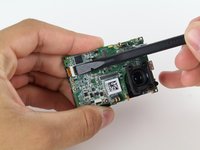
      • Remove the ribbon cable connecting the housing to the motherboard by flicking up the black clip with the spudger tool and gently pulling the cable out.

      Pergunte ao FixBot

      Comentar

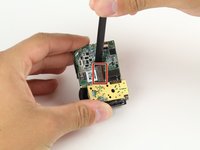
    3. GoPro Hero3+ Black Edition Camera Lens Replacement: passo 7, imagem 1 %32
      • Once the internal components are removed, take out your handy dandy spudger tool and pry off the piece of tape that holds down the image sensor.

      • Disclaimer: Our device is just a teardown unit and no longer has the tape. The markup depicts the location where the tape would be located.

      Pergunte ao FixBot

      Comentar

    4. GoPro Hero3+ Black Edition Camera Lens Replacement: passo 8, imagem 1 %32
      • Using your screwdriver, remove the four PH00 screws securing the image sensor to the motherboard.

      • Disclaimer: The unit used for this guide did not include these screws. Set them aside so you do not mix them up with the previously removed screws.

      Pergunte ao FixBot

      Comentar

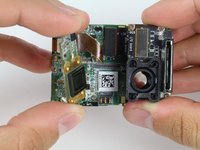
    5. GoPro Hero3+ Black Edition Camera Lens Replacement: passo 9, imagem 1 %32 GoPro Hero3+ Black Edition Camera Lens Replacement: passo 9, imagem 2 %32
      • Using the spudger tool, pry off the connector ribbon from the motherboard (don't worry it comes off pretty easily).

      • Remove the image sensor from the motherboard assembly.

      Pergunte ao FixBot

      Comentar

    1. GoPro Hero3+ Black Edition Camera Lens Replacement, microSD and Accessory Board: passo 10, imagem 1 %32
      • Using your screwdriver, remove the three 4mm PH00 screws that hold down the metal plate.

      Pergunte ao FixBot

      Comentar

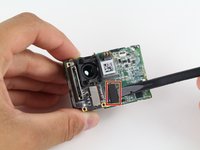
    2. GoPro Hero3+ Black Edition Camera Lens Replacement: passo 11, imagem 1 %32 GoPro Hero3+ Black Edition Camera Lens Replacement: passo 11, imagem 2 %32
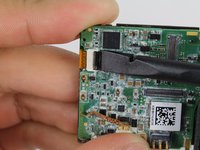
      • Using the spudger tool, pry off the corresponding ribbon cable from the motherboard.

      • The microSD/accessory board is ready to come off.

      Pergunte ao FixBot

      Comentar

    1. GoPro Hero3+ Black Edition Camera Lens Replacement, Motherboard: passo 12, imagem 1 %32
      • Using your trusty screwdriver, remove the single 3.2mm PH00 screw connecting the motherboard to the midframe.

      Pergunte ao FixBot

      Comentar

    2. GoPro Hero3+ Black Edition Camera Lens Replacement: passo 13, imagem 1 %32 GoPro Hero3+ Black Edition Camera Lens Replacement: passo 13, imagem 2 %32 GoPro Hero3+ Black Edition Camera Lens Replacement: passo 13, imagem 3 %32
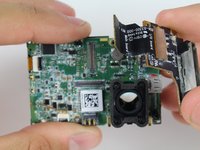
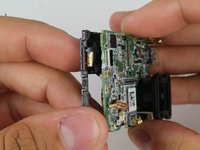
      • Use the spudger tool to disconnect the front LCD from the motherboard. Gently pull the ribbon cable out.

      • Gently pull the motherboard away from the midframe.

      Pergunte ao FixBot

      Comentar

    1. GoPro Hero3+ Black Edition Camera Lens Replacement, Camera Lens: passo 14, imagem 1 %32 GoPro Hero3+ Black Edition Camera Lens Replacement, Camera Lens: passo 14, imagem 2 %32
      • Simply use your PH00 screwdriver to remove the last three screws, and the lens housing is ready to come off.

      • Disclaimer: The unit used for this guide did not include these screws. Set them aside so you do not mix them up with the previously removed screws.

      Pergunte ao FixBot

      Comentar

Conclusão

To reassemble your device, follow these instructions in reverse order.

Cancelar: não concluí este guia.

5 outras pessoas executaram este guia.

Tyler Fox

Membro desde: 04/22/15

272 Reputação

Autoria de 1 guia

Equipe

Cal Poly, Team 6-15, Maness Spring 2015 Membro de Cal Poly, Team 6-15, Maness Spring 2015

CPSU-MANESS-S15S6G15

4 Membros

Autoria de 13 guias

1Comentário do guia

Hey, is there any lens to replace the original one you can recommend? I've seen prices from 15 to 80 Euro, basically everyone claiming the same features (170°).

Rick - Responder Compartilhar

Comentar

Visualizações:

Últimas 24 horas: 0

Últimos 7 dias: 5

Últimos 30 dias: 27

Ao todo: 4,550