Introdução
This guide demonstrates how to safely remove and replace the RAM stick of a Gateway LT2104u.
O que você precisa
-
-
Locate the the "L" shaped cover on the back, lower right hand side the device. Using a Philips screwdriver, remove the screw holding it in.
 Pergunte ao FixBot
-
-
-
-
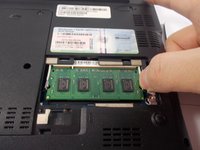
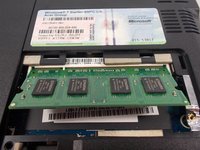
Gently push the levers on each side of the stick of RAM away from each other until the RAM springs into a 45° angle.
-
-
-
Carefully remove the stick of RAM by pulling at the same 45° angle the RAM is currently at until it detaches from the device.
-




To reassemble your device, follow these instructions in reverse order.
Cancelar: não concluí este guia.
Uma outra pessoa concluiu este guia.

Equipe

UMass Dartmouth, Team 7-5, Catania Spring 2016 Membro de UMass Dartmouth, Team 7-5, Catania Spring 2016
UMASSD-CATANIA-S16S7G5
3 Membros
Autoria de 10 guias
