Ir para o conteúdo principal
Participe da comunidade de reparos - Criar conta

Garmin Nuvi 255W Power Button Replacement

O que você precisa

  1. Garmin Nuvi 255W Power Button Replacement, Power Button: passo 1, imagem 1 %32
    • Remove the barcode sticker at the bottom of the device.

    Pergunte ao FixBot

    Comentar

  2. Garmin Nuvi 255W Power Button Replacement: passo 2, imagem 1 %32
    • Remove two 8.4 mm T5 screws from the bottom of the device.

    Pergunte ao FixBot

    Comentar

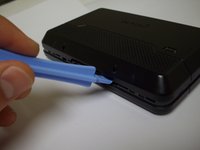
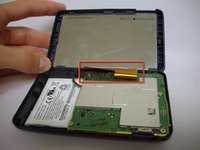
  3. Garmin Nuvi 255W Power Button Replacement: passo 3, imagem 1 %32 Garmin Nuvi 255W Power Button Replacement: passo 3, imagem 2 %32
    • Using a plastic opening tool, carefully pry open the device.

    • Open the device carefully, making sure not to damage the gold ribbon cable that connects the screen to the motherboard.

    Pergunte ao FixBot

    Comentar

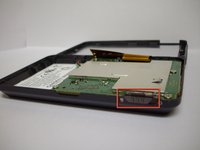
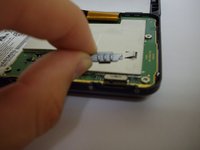
  4. Garmin Nuvi 255W Power Button Replacement: passo 4, imagem 1 %32 Garmin Nuvi 255W Power Button Replacement: passo 4, imagem 2 %32
    • Remove the power button.

    Pergunte ao FixBot

    Comentar

Conclusão

To reassemble your device, follow these instructions in reverse order.

Cancelar: não concluí este guia.

Timothy

Membro desde: 01/26/12

76 Reputação

Autoria de 3 guias

Equipe

Cal Poly, Team 9-3, Regan Winter 2012 Membro de Cal Poly, Team 9-3, Regan Winter 2012

CPSU-REGAN-W12S9G3

5 Membros

Autoria de 4 guias

0Comentários do guia

Comentar

Visualizações:

Últimas 24 horas: 2

Últimos 7 dias: 12

Últimos 30 dias: 52

Ao todo: 10,381