Ir para o conteúdo principal
Participe da comunidade de reparos - Criar conta

Fujitsu LIFEBOOK P7010D Keyboard Replacement

O que você precisa

  1. Fujitsu LIFEBOOK P7010D Keyboard Replacement, Battery: passo 1, imagem 1 %32
    • Place the laptop upside down on a table.

    Pergunte ao FixBot
    Comentar

  2. Fujitsu LIFEBOOK P7010D Keyboard Replacement: passo 2, imagem 1 %32
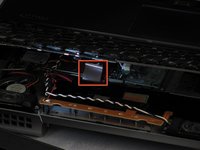
    • Locate the battery (the grey block). Find the two tabs on one end of the battery, as pictured.

    • Using two fingers, press both tabs down at once until they are fully depressed.

    Pergunte ao FixBot
    Comentar

  3. Fujitsu LIFEBOOK P7010D Keyboard Replacement: passo 3, imagem 1 %32
    • While holding the tabs down, slowly pivot the battery up.

    • The battery is now free and safe to pull out.

    Pergunte ao FixBot
    Comentar

  4. Fujitsu LIFEBOOK P7010D Keyboard Replacement, Keyboard: passo 4, imagem 1 %32 Fujitsu LIFEBOOK P7010D Keyboard Replacement, Keyboard: passo 4, imagem 2 %32
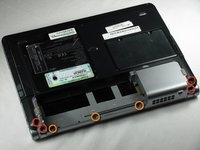
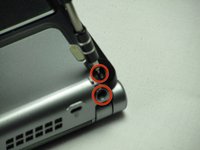
    • Unscrew three 2.4mm and one 5.7mm screws using a Phillips # 0.

    • Unscrew three 1.9mm screws in the battery compartment still using a Phillips # 0

    Pergunte ao FixBot

    Comentar

  5. Fujitsu LIFEBOOK P7010D Keyboard Replacement: passo 5, imagem 1 %32 Fujitsu LIFEBOOK P7010D Keyboard Replacement: passo 5, imagem 2 %32 Fujitsu LIFEBOOK P7010D Keyboard Replacement: passo 5, imagem 3 %32
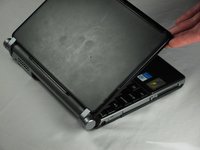
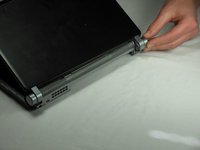
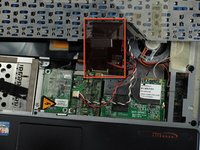
    • Mind the wire connections on the bottom right side of the monitor. They are still connected between the monitor and computer.

    • Raise the monitor as you normally would until it pops out by itself. Rotate the left side up and to the right to unhook hinges that may catch on the computer.

    • Lay the monitor flat next to the computer.

    Pergunte ao FixBot

    Comentar

  6. Fujitsu LIFEBOOK P7010D Keyboard Replacement: passo 6, imagem 1 %32 Fujitsu LIFEBOOK P7010D Keyboard Replacement: passo 6, imagem 2 %32
    Ferramenta utilizada neste passo:
    Anti-Static Wrist Strap
    $7.95
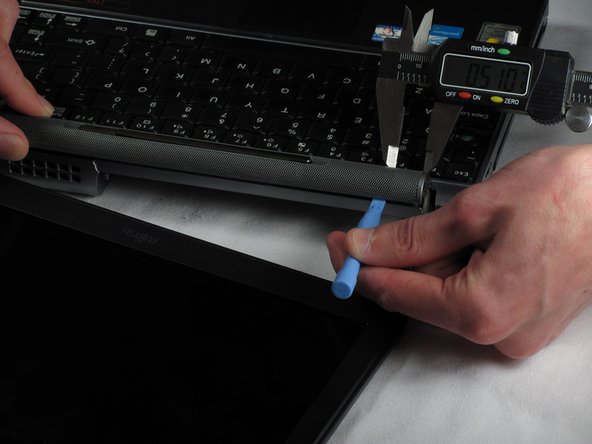
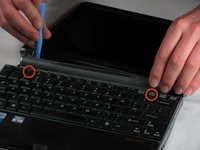
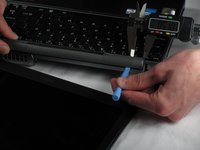
    • Using a smaller spudger (like a PX3688), pivot the sound case out above the "F2" and "Insert" buttons.

    • Lift the case out and set it aside.

    • For the proceeding steps, put on your anti-static wrist strap and attach the metal clip to something metal and grounded in order to protect the delicate circuitry inside the computer.

    Pergunte ao FixBot
    Comentar

  7. Fujitsu LIFEBOOK P7010D Keyboard Replacement: passo 7, imagem 1 %32 Fujitsu LIFEBOOK P7010D Keyboard Replacement: passo 7, imagem 2 %32 Fujitsu LIFEBOOK P7010D Keyboard Replacement: passo 7, imagem 3 %32
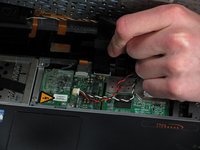
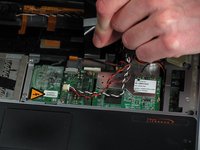
    • Using the same spudger, pry the top of the keyboard up above the "F2" key.

    • Turn the computer so that the bottom is facing you.

    • The keyboard is connected to a black plastic strip, slowly pull the keyboard and place it to the side.

    Pergunte ao FixBot
    Comentar

  8. Fujitsu LIFEBOOK P7010D Keyboard Replacement: passo 8, imagem 1 %32 Fujitsu LIFEBOOK P7010D Keyboard Replacement: passo 8, imagem 2 %32
    • Disconnect the keyboard by gently pulling on the hard plastic square straight up from the white connector.

    Pergunte ao FixBot

    Comentar

Conclusão

To reassemble your device, follow these instructions in reverse order.

Cancelar: não concluí este guia.

Uma outra pessoa concluiu este guia.

Nicholas Ross

Membro desde: 01/20/12

207 Reputação

Autoria de 7 guias

Equipe

Cal Poly, Team 10-31, Amido Winter 2012 Membro de Cal Poly, Team 10-31, Amido Winter 2012

CPSU-AMIDO-W12S10G31

5 Membros

Autoria de 21 guias

0Comentários do guia

Comentar

Visualizações:

Últimas 24 horas: 2

Últimos 7 dias: 10

Últimos 30 dias: 59

Ao todo: 4,946