Introdução
If your camera will not start, replacing the batteries might be a good solution.
-
-
-
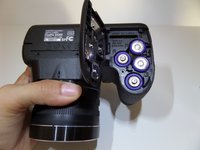
Begin with the camera upside down so that the battery compartment is showing.
 Pergunte ao FixBot
-
-
-
-
Slide the latch down towards the lens.
-
Push the battery cover out to the right, toward the HDMI and USB ports.
-
-
-
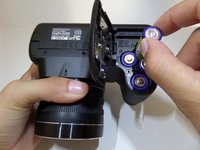
Lift the battery cover up so that you can view all four batteries.
-
Remove the batteries from the compartment.
-
-


To reassemble your device, follow these instructions in reverse order.
Cancelar: não concluí este guia.
4 outras pessoas executaram este guia.

Equipe

CSU Fullerton, Team 1-4, Bruce Fall 2015 Membro de CSU Fullerton, Team 1-4, Bruce Fall 2015
CSUF-BRUCE-F15S1G4
4 Membros
Autoria de 7 guias
2Comentários do guia
Available cover bettery how much
How much repair Fujifilm
