Essa tradução foi gerada por um programa e ainda não foi revisada por uma pessoa. Falas essa língua? Dá uma olhada.
Introdução
Se os botões traseiros do seu controle Flydigi Apex 5 não estiverem respondendo aos comandos, a causa pode ser a placa de expansão dos botões traseiros. Remover a placa de expansão dos botões traseiros do conjunto do controle e substituí-la, ou garantir que tudo esteja conectado durante a desmontagem, pode corrigir problemas com a resposta dos botões.
Siga este guia para aprender como acessar a placa de expansão dos botões traseiros do Flydigi Apex 5.
O que você precisa
-
-
-
Posicione o controle de modo que a parte traseira fique virada para você.
-
Aplique uma pressão firme para baixo para remover os dois gatilhos traseiros M3 e M4.
 Pergunte ao FixBot
-
-
-
Vire o controle de modo que a parte frontal fique voltada para você.
-
Remova o botão direcional (D-pad) puxando-o firmemente para longe do corpo do controle.
-
-
-
Remova a placa frontal transparente do controle, fixada magneticamente, puxando-a com firmeza para longe do corpo do controle, começando pela borda da placa.
-
-
-
-
Remova a tampa traseira pequena da parte de trás do controle empurrando-a para cima.
-
Desaparafuse os dois parafusos Phillips de 5,8 mm atrás da tampa da bateria usando uma chave Phillips #0.
-
-
-
Vire o controle de modo que a parte frontal fique voltada para você.
-
Desparafuse os seis parafusos de 10 mm da parte frontal do controle usando uma chave Torx T6.
-
-
-
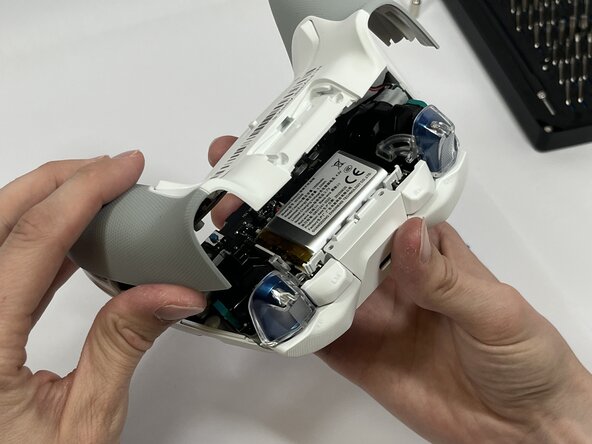
Insira a ferramenta de abertura de plástico entre as metades superior e inferior da carcaça do controle e force até que as duas peças se separem.
-
-
-
Remova cuidadosamente o cabo plano do gatilho traseiro com a pinça curva ou a espátula.
-
-
-
Remova os quatro parafusos de 5 mm da placa-filha do gatilho traseiro com uma chave Phillips #00.
-
Com cuidado, levante a placa para removê-la.
-
-




Para a remontagem de seu dispositivo, siga estas instruções na ordem inversa.

Equipe

Idaho State University, Team 1-3, Watkins Spring 2026 Membro de Idaho State University, Team 1-3, Watkins Spring 2026
ISU-WATKINS-S26S1G3
4 Membros
Autoria de 59 guias
