Introdução
Este guia mostrará como substituir o módulo do microfone do Fairphone 2.
O que você precisa
-
-
Escolha um canto da sua capa fina e insira a unha do polegar entre as duas partes.
-
Puxe a parte traseira da capa fina para separar as pequenas conexões de encaixe elástico.
-
Remova a parte traseira da capa fina.
 Pergunte ao FixBot
-
-
-
Insira a unha do polegar entre a parte frontal da capa fina e o corpo do celular.
-
Separe os conectores de encaixe elástico na parte frontal, puxando-a para o lado e empurrando contra a tela.
-
-
-
Remova a parte frontal da capa fina.
-
-
-
-
Empurre a bateria em direção à parte superior do celular.
-
Puxe a bateria para fora do celular.
-
-
-
Após retirar a bateria, você pode destravar o conjunto do display.
-
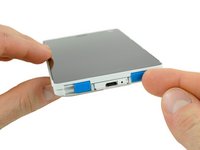
Mude as duas chaves azuis para a posição interna.
-
Deslize o conjunto do display em direção à parte inferior do celular.
-
-
-
Remova os quatro parafusos Phillips #0 que vêm de fábrica marcados com círculos azuis.
-
-
-
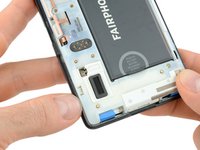
Retire o módulo do microfone por completo.
-








Para a remontagem de seu dispositivo, siga estas instruções na ordem inversa.
Informações sobre o que fazer com o módulo antigo podem ser encontradas na página de suporte da Fairphone e no fórum da Fairphone.
Cancelar: não concluí este guia.
107 outras pessoas executaram este guia.
Um agradecimento especial a esses tradutores:
100%

Translation Bot está nos ajudando a consertar o mundo! Quer contribuir?
Comece a traduzir ›

Equipe

Tobias Isakeit - Repairability Engineer Membro de Tobias Isakeit - Repairability Engineer
Business
1 Membro
Autoria de 1.239 guias
38Comentários do guia
Bonjour,
j'ai aussi galéré de peur de casser quelque chose, mais j'ai trouvé une solution sur le forum anglais de Fairphone:
https://forum.fairphone.com/t/fp2-teardo...
j'espère que ça t'aidera (faut oser un petit peu, voir comment ça glisse et faire un peu jouer tout ça... ça m'a pris 3/4 d'heure avant d'y arriver... sans rien endommager :) )
Just a little comment. I have seen many times the so called primary microphone error of the fairphone2 on the internet. I had the problem but it had nothing to do with the microphone but with the electric connection/module to the display module. If you have this problem you can check whether the mic works fine if you press tightly together the phone around the microphone module (just call another phone and try it). If this helps, there is a good chance that the true reason are worn out plastic parts around. I fixed it by putting a millimeter of tape underneath the microphone module and before screwing it on again. Now the module gets pressed a little bit against the display module and works just fine again (for the moment). Probably the little worn out outer shell was a part of the problem, I did not have a new one, but could imagine that buying a new outer shell for the fairphone2 might rather solve the problem than changing the microphone module. Just try it yourself before ordering a new microphone.
Thanks! That did the trick.
Thanks! Worked for me too after trying out different thicknesses (by adding and removing layers of tape). As well as adding tape on the inside of the microphone module (on long side of inverse 'L' shape) I added a little on the inside of the case itself (case is also breaking).
On a side note, love the ability to open up and adjust my phone!
The "millimeter tape fix" has been working fine for about a week, but now I'm back to square one: still no sound at the other end. I ordered a new hard cover but still to no avail... And Fairphone is still out of microphone modules. I'm out of options, I guess I'll just send my FP2 for repair, hoping it won't take too long.
