Ir para o conteúdo principal

DualSense Controller V5 Middle Trim Replacement

O que você precisa

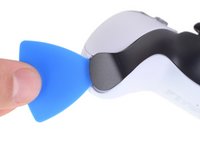
  1. DualSense Controller V5 Middle Trim Replacement, Unclip the right end of the middle trim: passo 1, imagem 1 %32 DualSense Controller V5 Middle Trim Replacement, Unclip the right end of the middle trim: passo 1, imagem 2 %32
    • Disconnect and power down your controller before you begin.

    • Insert an opening pick underneath the middle trim at the bottom-right corner of the controller to release the clips securing it to the case.

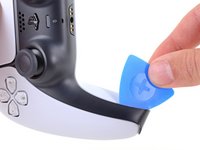
  2. DualSense Controller V5 Middle Trim Replacement, Unclip the lower-right edge of the middle trim: passo 2, imagem 1 %32 DualSense Controller V5 Middle Trim Replacement, Unclip the lower-right edge of the middle trim: passo 2, imagem 2 %32 DualSense Controller V5 Middle Trim Replacement, Unclip the lower-right edge of the middle trim: passo 2, imagem 3 %32
    • Slide the opening pick along the lower-right edge of the middle trim to release the clips securing it to the case.

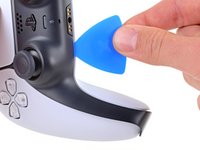
  3. DualSense Controller V5 Middle Trim Replacement, Unclip the left end of the middle trim: passo 3, imagem 1 %32 DualSense Controller V5 Middle Trim Replacement, Unclip the left end of the middle trim: passo 3, imagem 2 %32
    • Insert an opening pick underneath the middle trim at the bottom-left corner of the controller to release the clips securing it to the case.

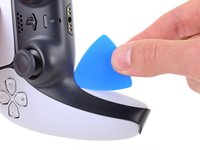
  4. DualSense Controller V5 Middle Trim Replacement, Unclip the lower-left edge of the middle trim: passo 4, imagem 1 %32 DualSense Controller V5 Middle Trim Replacement, Unclip the lower-left edge of the middle trim: passo 4, imagem 2 %32 DualSense Controller V5 Middle Trim Replacement, Unclip the lower-left edge of the middle trim: passo 4, imagem 3 %32
    • Slide the opening pick along the lower-left edge of the middle trim to release the clips securing it to the case.

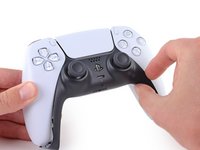
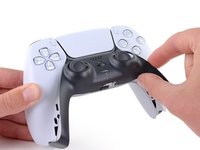
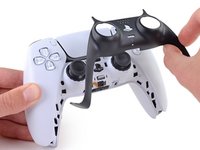
  5. DualSense Controller V5 Middle Trim Replacement, Remove the middle trim: passo 5, imagem 1 %32 DualSense Controller V5 Middle Trim Replacement, Remove the middle trim: passo 5, imagem 2 %32 DualSense Controller V5 Middle Trim Replacement, Remove the middle trim: passo 5, imagem 3 %32
    • Use your fingers to lift up the bottom edge of the middle trim to release the remaining clips.

    • Lift the middle trim over the joysticks to remove it.

Conclusão

To reassemble your device, follow these instructions in reverse order.

Repair didn’t go as planned? Try some basic troubleshooting, or ask our Answers community for help.

Uma outra pessoa concluiu este guia.

Spencer Day

Membro desde: 09/14/22

149.771 Reputação

Autoria de 995 guias

Equipe

iFixit Membro de iFixit

Staff

123 Membros

Autoria de 23.638 guias

0Comentários do guia

Comentar

Visualizações:

Últimas 24 horas: 0

Últimos 7 dias: 8

Últimos 30 dias: 37

Ao todo: 217