Ir para o conteúdo principal
Participe da comunidade de reparos - Criar conta

Disassembling IBM ThinkPad T42 Lower Bracket

O que você precisa

    1. Disassembling IBM ThinkPad T42 Lower Bracket, Bottom cover: passo 1, imagem 1 %32
      • Use a Phillips #0 screwdriver to remove the twenty screws on the underside of the T42.

      Pergunte ao FixBot

      Comentar

    2. Disassembling IBM ThinkPad T42 Lower Bracket, Rear screws: passo 2, imagem 1 %32
      • Remove the four Phillips screws located on either side of the rear of the T42 (there are two on each end.)

      Pergunte ao FixBot

      Comentar

    1. Disassembling IBM ThinkPad T42 Lower Bracket, Keyboard and Trackpad: passo 3, imagem 1 %32
      • Flip the laptop over and open the screen to access the keyboard and trackpad.

      • The keyboard and trackpad are connected to the motherboard. Before removing the keyboard and trackpad, disconnect both components from the motherboard, as shown in the following step.

      • The bezel and keyboard will be loose, be careful.

      Pergunte ao FixBot

      Comentar

    2. Disassembling IBM ThinkPad T42 Lower Bracket: passo 4, imagem 1 %32 Disassembling IBM ThinkPad T42 Lower Bracket: passo 4, imagem 2 %32
      • Carefully maneuver the palm rest away from the keyboard, as both the keyboard and palm rest/trackpad will come off together.

      • Remember, both the keyboard and trackpad have connectors to the motherboard. Disconnect these before completely removing either component.

      Pergunte ao FixBot

      Comentar

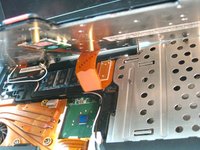
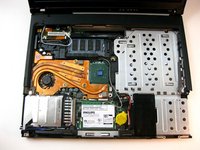
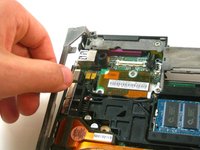
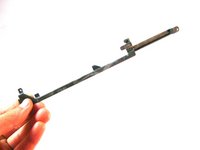
    1. Disassembling IBM ThinkPad T42 Lower Bracket, Lower Bracket: passo 5, imagem 1 %32 Disassembling IBM ThinkPad T42 Lower Bracket, Lower Bracket: passo 5, imagem 2 %32
      • Grasp the metal bracket to remove it from the device.

      Pergunte ao FixBot

      Comentar

    2. Disassembling IBM ThinkPad T42 Lower Bracket, Microphone cover: passo 6, imagem 1 %32
      • Remove the rubber cover from the microphone.

      Pergunte ao FixBot

      Comentar

Conclusão

To reassemble your device, follow these instructions in reverse order.

Cancelar: não concluí este guia.

Uma outra pessoa concluiu este guia.

Equipe

Cal Poly, Team 29-76, Johann Spring 2010 Membro de Cal Poly, Team 29-76, Johann Spring 2010

CPSU-JOHANN-S10S29G76

4 Membros

Autoria de 135 guias

0Comentários do guia

Comentar

Visualizações:

Últimas 24 horas: 0

Últimos 7 dias: 9

Últimos 30 dias: 32

Ao todo: 3,948