Essa tradução foi gerada por um programa e ainda não foi revisada por uma pessoa. Falas essa língua? Dá uma olhada.

Desmontagem do conjunto da placa-mãe do DualShock 4

Última atualização em 27 de jul de 2026
Visualizações: 761 mil
Visualizar Estatísticas:
- Últimas 24 horas:
- 45
- Últimos 7 dias:
- 345
- Últimos 30 dias:
- 1.511
- Ao todo:
- 761.240
Comentários: 70
50 comments on steps, 20 guide comments.
Go to guide commentsConcluído: 162 163
162 pessoas marcaram este guia como "concluído". Será você o próximo?
163· pessoas marcaram este guia como "concluído". Incluindo você — ótimo trabalho!
Favorites: 32 33
32 pessoas favoritaram (e se inscreveram) neste guia. Você será o próximo?
33 pessoas marcaram como favorito (e assinaram) este guia - incluindo você!
Introdução
Ir para o passo 1 ↓Use este guia para desmontar o conjunto da placa-mãe da tampa frontal e da tampa traseira.
O que você precisa
Peças


Ferramentas


-
-
-
Com a chave Phillips #00, remova os quatro parafusos de 6,0 mm que prendem a tampa traseira ao controle.
 Pergunte ao FixBot
-
-
-
Começando com a alça esquerda:
-
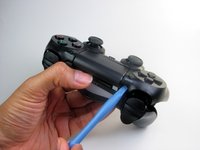
Aperte a alça esquerda do controle para criar uma abertura.
-
Insira uma Ferramenta de abertura na fresta e deslize-a em direção ao joystick.
-
Puxe a ferramenta para baixo para abrir a carcaça.
-
Repita estes passos para a alça direita.
-
-
-
Insira uma Ferramenta de abertura de plástico nas divisões da carcaça e puxe para baixo para abrir o invólucro perto dos seguintes botões:
-
Botão Share
-
Botão Options
-
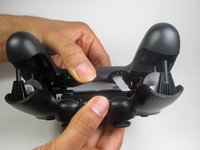
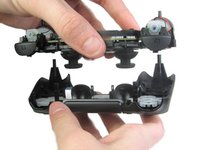
Separe as coberturas de plástico do controle, observando que elas ainda estarão conectadas por cabos flat da placa de circuito.
-
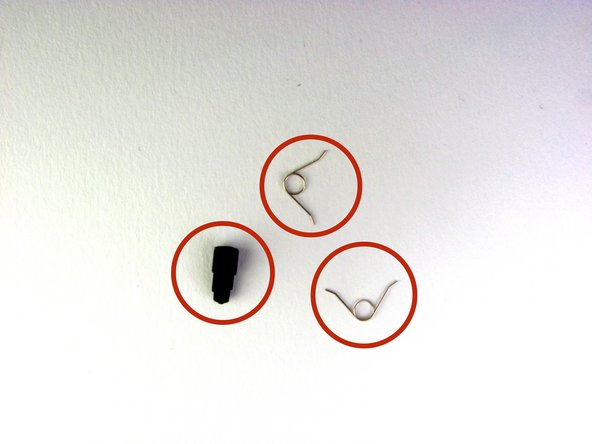
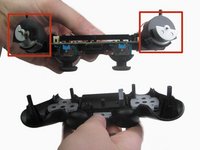
2 Molas de gatilho
-
1 Extensão cinza do botão de reset
-
-
-
-
-
-
Remova o único parafuso Phillips de 6,0 mm localizado abaixo da trava da bateria com a chave Phillips #00.
-
-
-
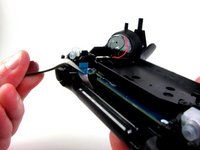
Desconecte cuidadosamente o cabo flat do touchpad conectado à placa-mãe usando uma pinça romba. O cabo flat do touchpad está conectado à placa-mãe por um conector que abre e fecha para prender e soltar. Durante a remontagem, para reconectar o cabo flat, a trava plástica precisará ser removida cuidadosamente da placa-mãe e a trava de abertura deve ser levantada.
-
-
-
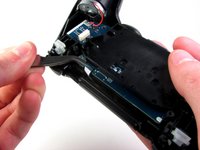
Desencaixe cuidadosamente o conjunto da placa-mãe da tampa frontal.
-
Os motores de vibração estão levemente fixados ao conjunto da placa-mãe. Dê suporte nas duas extremidades para facilitar a separação.
-
-
-
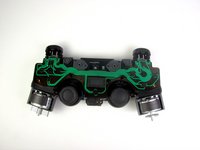
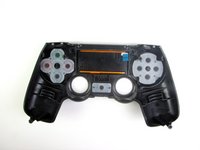
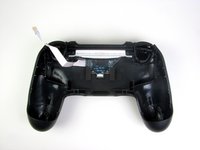
A desmontagem bem-sucedida do controle resultará nas três peças a seguir, respectivamente:
-
Conjunto da placa-mãe
-
Tampa frontal
-
Tampa traseira
-
-








Para a remontagem de seu dispositivo, siga estas instruções na ordem inversa.
Cancelar: não concluí este guia.
162 outras pessoas executaram este guia.

Equipe

Cal Poly, Team 6-21, Maness Winter 2014 Membro de Cal Poly, Team 6-21, Maness Winter 2014
CPSU-MANESS-W14S6G21
4 Membros
Autoria de 84 guias
20Comentários do guia
So my controller decided to stop charging (still stayed on until the battery completely dained) a couple weeks ago so I bought a new charging port and ribbon and replaced it put it all back together just for it to work the same not charging but on so I figured maybe it was the battery all along but this time I took my other new controller apart so I could test the battery by connecting it to the new controller to see if it will take charge which they would take charge on the new controller but when I took the new ones and put it in the old on it still wouldn't take charge I have no Idea what else to do everything else works it just won't charge even the light is still on but if I keep it connected to a USB cable it will stay on since the battery was dead but the battery status remains the same.
Same here except mine won't even work while plugged in. It just turns on and dies
there is a new and different version out (looks the same) different internals - anyone got one to show us? (Model = CUH-ZCT1E?)
How do you put back the touchpad? That $@$* Is a &&^&^$^ paradox.
The top of the touchpad that has the groove has to be inserted at the part where the bottom of the touchpad is normally. Then you you move it up and you can wiggle it through the arc. After that it fits snugly like it supposed to.
