Essa tradução foi gerada por um programa e ainda não foi revisada por uma pessoa. Falas essa língua? Dá uma olhada.
O que você precisa
-
-
-
Primeiro, verifique se a porta de conexão do seu controle (seja ele sem fio ou não) possui todos os pinos.
-
Se você tem um controle com fio (um controle com um cabo que se conecta diretamente ao seu console), tente dobrá-lo em direções diferentes. Isso pode reconectar conexões rompidas dentro do cabeamento do controle e pode ser uma solução temporária.
 Pergunte ao FixBot
-
-
-
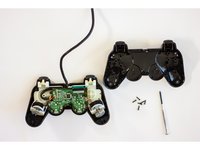
Vire o controle e remova todos os 6 parafusos da parte inferior.
-
-
-
Depois de remover os parafusos, abra o controle com cuidado usando as mãos.
-
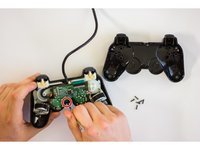
Remova o parafuso que prende a placa de circuito.
-
-
-
-
Remova cuidadosamente a placa de circuito da tampa frontal do controle.
-
-
-
Analise as almofadas de borracha para verificar se há algum detrito que possa estar obstruindo as almofadas pretas. Elas fazem uma conexão elétrica na placa e podem não estar em contato adequado.
-
-
-
Examine a placa flexível do gatilho quanto a qualquer sujeira ou detrito que possa obstruir o teclado de borracha.
-
-
-
Verifique a conexão da placa flexível do gatilho à placa de circuito principal do seu controle.
-
-
-
Se todos os passos anteriores foram realizados e você ainda estiver com dificuldades para fazer com que os seus botões funcionem, considere substituir a placa de circuito principal ou a placa flexível do gatilho.
-
-
-
Siga os passos de desmontagem na ordem inversa até que o controle esteja montado novamente. Conecte o controle ao console e teste se o reparo funcionou.
-
-




Cancelar: não concluí este guia.
48 outras pessoas executaram este guia.

Equipe

Cal Poly, Team 17-5, Green Fall 2015 Membro de Cal Poly, Team 17-5, Green Fall 2015
CPSU-GREEN-F15S17G5
4 Membros
Autoria de 36 guias
7Comentários do guia
Dualshock 2 controllers, model A and H, are having 8 pins, not 9. Your first Step is false and rarely wires are the cause of the problem.
No my Dual-shock 2 controller has 9 pins so you are wrong he is right man.
Eva Langley is correct, some of these controllers have only 8 pins, not 9. I myself can conformed this because I just recently opened one of two brand new fresh out of the box Sony original equipment controllers that I purchased (for a little less than $10 a piece) during a clearance sale at my local Sears just before they went out of business. So Eva is NOT wrong. I still have the second one still in the box and before anyone ask, I don’t won’t to sale. I purchased them because I have had both my original controllers go out after they were sitting up for a few years without use. My game units are very well taken care of but the controllers of the PS2 just stopped working and finding a definitive answer to why this happens is STILL very elusive in 2019.
After opening one of these, the R2 and L2 buttons don't feel right, is there a way to fix this?
Try to put R2 and L2 after you close the shell. The buttons have clips that hold on position after you insert them .
