Ir para o conteúdo principal
Participe da comunidade de reparos - Criar conta

Desktop PC Front Fan Replacement

O que você precisa

  1. Desktop PC Front Fan Replacement, Left Panel: passo 1, imagem 1 %32
    • Unplug the computer from the power supply before any maintenance or disassembly.

    • Remove the two Phillips #2 head 5mm screws from the back side of the computer case. You only need to remove the screws that hold down the panel.

    • These screws can usually be removed by hand.

    • Be sure to wear an anti-static bracelet or use an anti-static mat to ensure important components are not damaged by static electricity.

    Pergunte ao FixBot
  2. Desktop PC Front Fan Replacement: passo 2, imagem 1 %32 Desktop PC Front Fan Replacement: passo 2, imagem 2 %32
    • Next, remove the side panel of the computer case to allow access into the computer. Slide the panel towards the back of the computer and lift it up to remove.

    • If there is a fan mounted on the side panel, make sure to unplug the cable before fully removing the panel.

    Pergunte ao FixBot
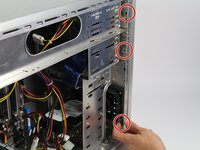
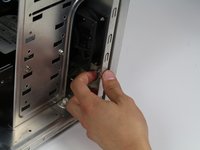
  3. Desktop PC Front Fan Replacement, Front Fan: passo 3, imagem 1 %32 Desktop PC Front Fan Replacement, Front Fan: passo 3, imagem 2 %32
    • Push to unlatch three grey connectors on the front panel.

    Pergunte ao FixBot
  4. Desktop PC Front Fan Replacement: passo 4, imagem 1 %32
    • Disconnect the front panel from the computer face.

    Pergunte ao FixBot
  5. Desktop PC Front Fan Replacement: passo 5, imagem 1 %32
    • Remove four Phillips #2 head, 5mm screws holding in the fan.

    Pergunte ao FixBot
  6. Desktop PC Front Fan Replacement: passo 6, imagem 1 %32
    • Slide the fan out from the side of the casing.

    Pergunte ao FixBot
  7. Desktop PC Front Fan Replacement: passo 7, imagem 1 %32
    • Disconnect the power cable from the fan.

    Pergunte ao FixBot
Conclusão

To reassemble your device, follow these instructions in reverse order.

39 outras pessoas executaram este guia.

David Lennon

Membro desde: 04/14/15

10.180 Reputação

Autoria de 10 guias

Equipe

Cal Poly, Team 4-5, Maness Spring 2015 Membro de Cal Poly, Team 4-5, Maness Spring 2015

CPSU-MANESS-S15S4G5

4 Membros

Autoria de 45 guias

2Comentários do guia

My two bottom connecters holding the face of my pc case have screws in them. Problem is that I can't fit a screw driver in the gaps to remove the screws! Any tips?

Jimmy Jam - Responder Compartilhar

I did this with my pc and I was able to restore and add a new fan because the other one wouldn’t work because the wire was snapped so I decided to replace it and this guide helped me

TechNinja - Responder Compartilhar

Comentar

Visualizações:

Últimas 24 horas: 11

Últimos 7 dias: 49

Últimos 30 dias: 222

Ao todo: 31,253