Ir para o conteúdo principal
Participe da comunidade de reparos - Criar conta

Dell XPS M1530 Wireless Card Replacement

O que você precisa

  1. Dell XPS M1530 Wireless Card Replacement, Battery: passo 1, imagem 1 %32
    • Turn the computer upside down with the battery facing you.

    • Turn the computer off and disconnect the charging cable from the computer.

    • Failure to unplug the charging cable may result in electric shock.

    Pergunte ao FixBot

    Comentar

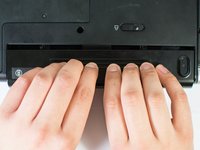
  2. Dell XPS M1530 Wireless Card Replacement: passo 2, imagem 1 %32
    • Push the switch as far to the right as possible to unlock the battery.

    Pergunte ao FixBot

    Comentar

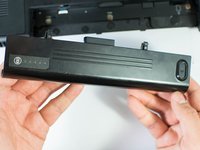
  3. Dell XPS M1530 Wireless Card Replacement: passo 3, imagem 1 %32 Dell XPS M1530 Wireless Card Replacement: passo 3, imagem 2 %32
    • Remove the battery using two hands and pull it away from the computer.

    Pergunte ao FixBot

    Comentar

  4. Dell XPS M1530 Wireless Card Replacement, Wireless Card: passo 4, imagem 1 %32
    • Unscrew the two 4.7mm Phillips #1 screws on the bottom panel of the laptop.

    • Two 4.7mm Philips #1 screws

    Pergunte ao FixBot

    Comentar

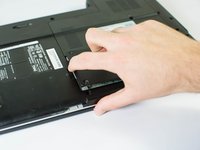
  5. Dell XPS M1530 Wireless Card Replacement: passo 5, imagem 1 %32 Dell XPS M1530 Wireless Card Replacement: passo 5, imagem 2 %32
    • Lift the panel up from the indented area.

    • This indent should provide enough grip to remove the panel with ease.

    Pergunte ao FixBot

    Comentar

  6. Dell XPS M1530 Wireless Card Replacement: passo 6, imagem 1 %32
    • Remove the single 3.9mm Phillips #1 screw in the upper right corner of the wireless card.

    • One 3.9mm Phillips #1 screw

    Pergunte ao FixBot

    Comentar

  7. Dell XPS M1530 Wireless Card Replacement: passo 7, imagem 1 %32
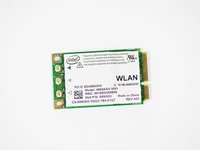
    • Lift the card out at an angle and carefully remove it.

    Pergunte ao FixBot

    Comentar

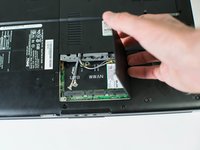
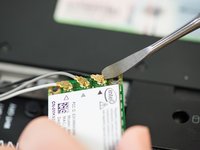
  8. Dell XPS M1530 Wireless Card Replacement: passo 8, imagem 1 %32 Dell XPS M1530 Wireless Card Replacement: passo 8, imagem 2 %32
    • Use a spudger to carefully disconnect the antenna cables from the card by prying them straight up off the board.

    • It's best to use an ESD-safe tool, such as a nylon spudger, rather than the metal spudger shown in the photo.

    • Note the order of colors for the antenna cables indicated on the card.

    Pergunte ao FixBot

    Comentar

Conclusão

To reassemble your device, follow these instructions in reverse order.

Cancelar: não concluí este guia.

Uma outra pessoa concluiu este guia.

Jase Sasaki

Membro desde: 01/22/15

721 Reputação

Autoria de 5 guias

Equipe

Cal Poly, Team 18-4, Maness Winter 2015 Membro de Cal Poly, Team 18-4, Maness Winter 2015

CPSU-MANESS-W15S18G4

4 Membros

Autoria de 8 guias

0Comentários do guia

Comentar

Visualizações:

Últimas 24 horas: 2

Últimos 7 dias: 7

Últimos 30 dias: 28

Ao todo: 2,141