Ir para o conteúdo principal
Participe da comunidade de reparos - Criar conta

Dell XPS 720 H2C Sound Card Replacement

    1. Dell XPS 720 H2C Sound Card Replacement, Removing Dell XPS 720 H2C Cover Panel: passo 1, imagem 1 %32 Dell XPS 720 H2C Sound Card Replacement, Removing Dell XPS 720 H2C Cover Panel: passo 1, imagem 2 %32
      • Remove the cover panel on the side of the computer by pulling out the latch on the back panel and pulling the panel downwards towards the ground.

      Pergunte ao FixBot

      Comentar

    1. Dell XPS 720 H2C Sound Card Replacement, Sound Card: passo 2, imagem 1 %32 Dell XPS 720 H2C Sound Card Replacement, Sound Card: passo 2, imagem 2 %32
      • Before handling the inside of the computer, ensure that all wires are disconnected from the audio ports along the back panel.

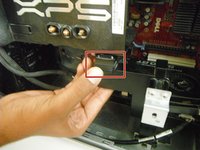
      • The sound card is located towards the bottom of the computer, near the righthand side (see red outline).

      Pergunte ao FixBot

      Comentar

    2. Dell XPS 720 H2C Sound Card Replacement: passo 3, imagem 1 %32 Dell XPS 720 H2C Sound Card Replacement: passo 3, imagem 2 %32 Dell XPS 720 H2C Sound Card Replacement: passo 3, imagem 3 %32
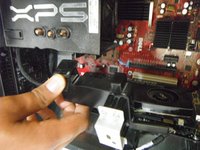
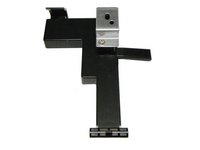
      • To remove the support below the processor: press down on the latch at the top of the support, then pull the support outwards, towards yourself.

      Pergunte ao FixBot

      Comentar

    3. Dell XPS 720 H2C Sound Card Replacement: passo 4, imagem 1 %32
      • To unplug the wire that connects the sound card to the motherboard: grasp the wire tightly and pull it outwards, towards yourself.

      • The wire may appear to be stuck. Keep increasing your pulling force until the wire unplugs. It will not break.

      Pergunte ao FixBot

      Comentar

    4. Dell XPS 720 H2C Sound Card Replacement: passo 5, imagem 1 %32
      • To release the sound card from the motherboard casing: find the blue tab that is the third from the bottom (fifth from the top), and press down and to the right on the tab.

      Pergunte ao FixBot

      Comentar

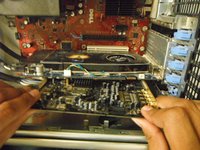
    5. Dell XPS 720 H2C Sound Card Replacement: passo 6, imagem 1 %32 Dell XPS 720 H2C Sound Card Replacement: passo 6, imagem 2 %32
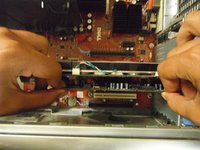
      • To remove the sound card from the motherboard: gently grasp the sound card and pull directly outward, towards yourself.

      • Again, this may appear to be stuck in place. Slightly increase your pulling force until the card releases from the motherboard.

      Pergunte ao FixBot

      Comentar

Conclusão

To reassemble your device, follow these instructions in reverse order.

Cancelar: não concluí este guia.

Uma outra pessoa concluiu este guia.

G B

Membro desde: 04/17/13

67 Reputação

Autoria de 3 guias

0Comentários do guia

Comentar

Visualizações:

Últimas 24 horas: 0

Últimos 7 dias: 10

Últimos 30 dias: 33

Ao todo: 1,928