Ir para o conteúdo principal
Participe da comunidade de reparos - Criar conta

Dell Vostro 1015 Memory Module Replacement

O que você precisa

  1. Dell Vostro 1015 Memory Module Replacement, Battery: passo 1, imagem 1 %32 Dell Vostro 1015 Memory Module Replacement, Battery: passo 1, imagem 2 %32
    • Slide the battery latches apart to the unlock position.

    • Lift the battery from the computer.

  2. Dell Vostro 1015 Memory Module Replacement, Access Panel: passo 2, imagem 1 %32 Dell Vostro 1015 Memory Module Replacement, Access Panel: passo 2, imagem 2 %32
    • Remove the six screws that secure the access panel to the computer.

    • Remove the access panel from the computer.

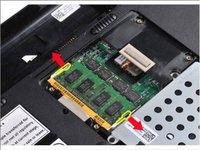
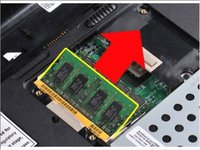
  3. Dell Vostro 1015 Memory Module Replacement, Memory Module: passo 3, imagem 1 %32 Dell Vostro 1015 Memory Module Replacement, Memory Module: passo 3, imagem 2 %32
    • Use your fingertips to carefully spread apart the securing clips on each end of the memory module connector until the first module pops up.

    • Slide the memory module from its socket and remove the module from the computer.

Conclusão

To reassemble your device, follow these instructions in reverse order.

Uma outra pessoa concluiu este guia.

Johnathan Hammond

Membro desde: 02/28/18

45.681 Reputação

Autoria de 408 guias

Equipe

RampUP America, Inc. Membro de RampUP America, Inc.

Community

44 Membros

Autoria de 1.997 guias

0Comentários do guia

Comentar

Visualizações:

Últimas 24 horas: 2

Últimos 7 dias: 7

Últimos 30 dias: 15

Ao todo: 489