Ir para o conteúdo principal
Participe da comunidade de reparos - Criar conta

Dell Studio 1737 Keyboard Replacement

O que você precisa

  1. Dell Studio 1737 Keyboard Replacement, Battery: passo 1, imagem 1 %32 Dell Studio 1737 Keyboard Replacement, Battery: passo 1, imagem 2 %32
    • Slide the battery release slider all the way to the right and push the battery straight out of the back of the computer

    Pergunte ao FixBot
  2. Dell Studio 1737 Keyboard Replacement, Keyboard: passo 2, imagem 1 %32
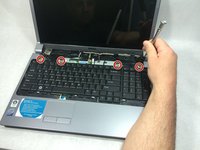
    • Use a plastic opening tool to detach the internal clips (marked with red boxes in photo) and release the small plastic panel above the keyboard

    • This panel doesn't come off just yet, this step is just to make it easier when it comes time to remove it

    Pergunte ao FixBot
  3. Dell Studio 1737 Keyboard Replacement: passo 3, imagem 1 %32
    • Remove the 4mm ph1 screw under the battery

    Pergunte ao FixBot
  4. Dell Studio 1737 Keyboard Replacement: passo 4, imagem 1 %32 Dell Studio 1737 Keyboard Replacement: passo 4, imagem 2 %32 Dell Studio 1737 Keyboard Replacement: passo 4, imagem 3 %32
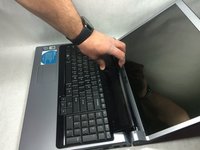
    • Pry black panel away from laptop body starting at the base of the screen

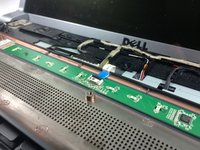
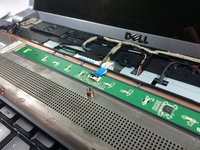
    • Be careful when flipping the panel over, as the panel is still attached by the fragile ribbon cable

    • Flip the panel over onto the keyboard

    • Detach the ribbon cable from the motherboard as shown

    Pergunte ao FixBot
  5. Dell Studio 1737 Keyboard Replacement: passo 5, imagem 1 %32
    • Starting at the top where you just removed the black panel, pry the black bezel away from the outside of the keyboard

    Pergunte ao FixBot
  6. Dell Studio 1737 Keyboard Replacement: passo 6, imagem 1 %32 Dell Studio 1737 Keyboard Replacement: passo 6, imagem 2 %32
    • Use a small screwdriver to take out the 4 4mm ph1 screws along the top of the keyboard

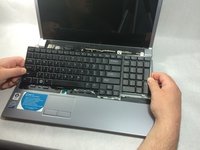
    • Lift from the top of the keyboard and flip it over onto the palmrest

    • Again, be very careful of the ribbon cable attaching it, as these are easily damaged

    Pergunte ao FixBot
  7. Dell Studio 1737 Keyboard Replacement: passo 7, imagem 1 %32 Dell Studio 1737 Keyboard Replacement: passo 7, imagem 2 %32
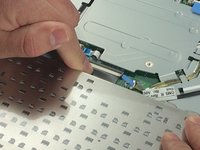
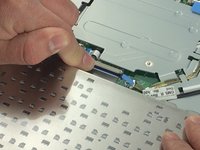
    • Remove the ribbon cable as shown

    Pergunte ao FixBot
Conclusão

To reassemble your device, follow these instructions in reverse order.

2 outras pessoas executaram este guia.

Equipe

0Comentários do guia

Comentar

Visualizações:

Últimas 24 horas: 0

Últimos 7 dias: 4

Últimos 30 dias: 35

Ao todo: 914