Essa tradução foi gerada por um programa e ainda não foi revisada por uma pessoa. Falas essa língua? Dá uma olhada.
Introdução
Se o seu Dell Precision M3800 estiver exibindo a “Tela Azul da Morte” ou qualquer outro erro mencionando problemas com a memória RAM, use este guia para substituir a memória RAM.
A memória RAM em um computador funciona como a memória de trabalho, e uma memória RAM com defeito pode causar erros no computador que o impedem de funcionar corretamente.
Antes de começar, certifique-se de desligar o notebook e desconectá-lo da(s) fonte(s) de energia externa.
O que você precisa
-
-
-
Use uma chave Torx T5 para desparafusar os dez parafusos de 3 mm da capa traseira do notebook.
-
Levante a capa prateada do painel traseiro para revelar dois parafusos.
-
Use uma chave Phillips para remover os dois parafusos sob a capa prateada.
 Pergunte ao FixBot
-
-
-
Use uma Ferramenta de abertura para fazer alavanca ao redor das bordas do painel traseiro para soltá-lo.
-
Remova o painel traseiro.
-
-
-
-
-
-
Desconecte o cabo da bateria da placa-mãe [1].
-
Use uma chave Phillips para remover os quatro parafusos Phillips que prendem a bateria ao notebook.
-
Levante a bateria e retire-a do computador [2].
-
-
-
-
-
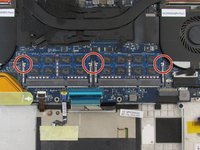
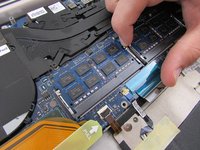
Puxe as pequenas travas prateadas da memória RAM para fora para soltá-la do corpo do notebook.
-
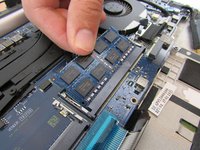
Remova a memória RAM do corpo do notebook (ela deve sair facilmente após puxar as travas prateadas).
-
-


Para a remontagem de seu dispositivo, siga estas instruções na ordem inversa.
Cancelar: não concluí este guia.
Uma outra pessoa concluiu este guia.

Equipe

Embry-Riddle Aeronautical University, Team S12-G2, Lamothe Fall 2019 Membro de Embry-Riddle Aeronautical University, Team S12-G2, Lamothe Fall 2019
ERAU-LAMOTHE-F19S12G2
4 Membros
Autoria de 53 guias
