Ir para o conteúdo principal
Participe da comunidade de reparos - Criar conta

Dell Optiplex 745 Small Form Factor Fan Replacement

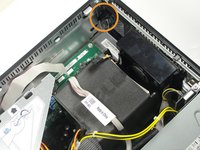
  1. Dell Optiplex 745 Small Form Factor Fan Replacement, Opening the case: passo 1, imagem 1 %32 Dell Optiplex 745 Small Form Factor Fan Replacement, Opening the case: passo 1, imagem 2 %32
    • Pull the tab and the lid will pop up.

    Pergunte ao FixBot

    Comentar

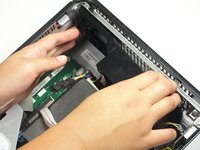
  2. Dell Optiplex 745 Small Form Factor Fan Replacement: passo 2, imagem 1 %32 Dell Optiplex 745 Small Form Factor Fan Replacement: passo 2, imagem 2 %32
    • Grab the lid and pull it up and off.

    Pergunte ao FixBot

    Comentar

  3. Dell Optiplex 745 Small Form Factor Fan Replacement, Fan: passo 3, imagem 1 %32 Dell Optiplex 745 Small Form Factor Fan Replacement, Fan: passo 3, imagem 2 %32 Dell Optiplex 745 Small Form Factor Fan Replacement, Fan: passo 3, imagem 3 %32
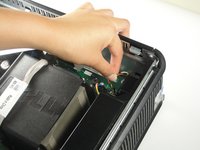
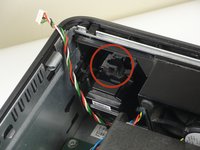
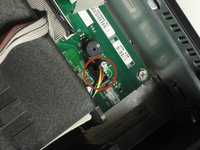
    • Disconnect the cable bundle from the motherboard.

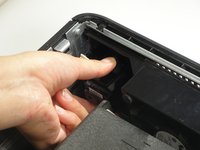
    • Press the tab down, and pull the component toward yourself.

    Pergunte ao FixBot

    Comentar

  4. Dell Optiplex 745 Small Form Factor Fan Replacement: passo 4, imagem 1 %32 Dell Optiplex 745 Small Form Factor Fan Replacement: passo 4, imagem 2 %32 Dell Optiplex 745 Small Form Factor Fan Replacement: passo 4, imagem 3 %32
    • Pull the cable bundle out of the motherboard.

    • Push the black tab away from the computer case and pull the fan away from the case.

    Pergunte ao FixBot

    Comentar

Conclusão

To reassemble your device, follow these instructions in reverse order.

Cancelar: não concluí este guia.

7 outras pessoas executaram este guia.

Tyler Whalen

Membro desde: 09/29/14

844 Reputação

Autoria de 3 guias

Equipe

Cal Poly, Team 13-10, Forte Fall 2014 Membro de Cal Poly, Team 13-10, Forte Fall 2014

CPSU-FORTE-F14S13G10

6 Membros

Autoria de 12 guias

0Comentários do guia

Comentar

Visualizações:

Últimas 24 horas: 1

Últimos 7 dias: 6

Últimos 30 dias: 23

Ao todo: 4,826