Ir para o conteúdo principal
Participe da comunidade de reparos - Criar conta

Dell Latitude D620 Display Replacement

O que você precisa

    1. Dell Latitude D620 Display Replacement, Keyboard: passo 1, imagem 1 %32
      • Power down the laptop and remove the battery.

      • Open the laptop cover all of the way.

      Pergunte ao FixBot

      Comentar

    2. Dell Latitude D620 Display Replacement: passo 2, imagem 1 %32 Dell Latitude D620 Display Replacement: passo 2, imagem 2 %32 Dell Latitude D620 Display Replacement: passo 2, imagem 3 %32
      • Locate the notch under the cover at the top of the keyboard

      • Using the spudger as a lever, lift the plastic covering

      • Carefully remove the rest of the covering from right to left

      Pergunte ao FixBot

      Comentar

    3. Dell Latitude D620 Display Replacement: passo 3, imagem 1 %32
      • Unscrew the top portion of the keyboard using a #00 screwdriver

      Pergunte ao FixBot

      Comentar

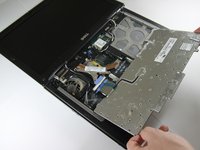
    4. Dell Latitude D620 Display Replacement: passo 4, imagem 1 %32
      • Hold keyboard from the top and gently pull towards the LCD screen to remove the keyboard from the case

      • Don't pull on the keyboard too forcefully because it is attached to the motherboard with a short, thin ribbon cable

      Pergunte ao FixBot
      Comentar

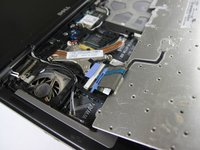
    5. Dell Latitude D620 Display Replacement: passo 5, imagem 1 %32 Dell Latitude D620 Display Replacement: passo 5, imagem 2 %32
      • Once keyboard is out of the case, lay it face-down on the track pad

      Pergunte ao FixBot
      Comentar

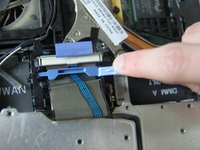
    6. Dell Latitude D620 Display Replacement: passo 6, imagem 1 %32 Dell Latitude D620 Display Replacement: passo 6, imagem 2 %32
      • Using a small spudger, pull back on the black bar to release the blue lever

      Pergunte ao FixBot

      Comentar

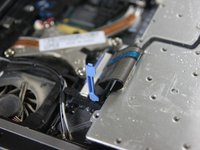
    7. Dell Latitude D620 Display Replacement: passo 7, imagem 1 %32
      • Pull up on the metal bar connected to the socket to detach the ribbon cable

      Pergunte ao FixBot

      Comentar

    1. Dell Latitude D620 Display Replacement, Display: passo 8, imagem 1 %32
      • Detach cables that connect the display to the body of the laptop

      Pergunte ao FixBot
      Comentar

    2. Dell Latitude D620 Display Replacement: passo 9, imagem 1 %32
      • Disconnect the black cable attached to the motherboard

      Pergunte ao FixBot
      Comentar

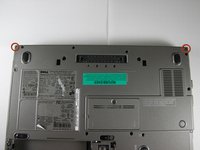
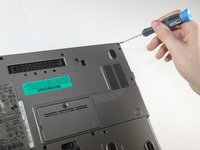
    3. Dell Latitude D620 Display Replacement: passo 10, imagem 1 %32 Dell Latitude D620 Display Replacement: passo 10, imagem 2 %32
      • Close the laptop lid

      • Turn the laptop over onto its backside

      • Unscrew the two screws shown in the picture using a #00 screwdriver

      Pergunte ao FixBot

      Comentar

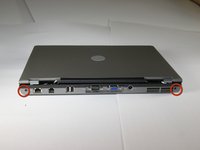
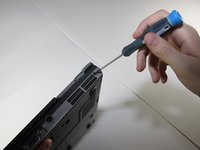
    4. Dell Latitude D620 Display Replacement: passo 11, imagem 1 %32 Dell Latitude D620 Display Replacement: passo 11, imagem 2 %32
      • Face the laptop's back ports towards you

      • Unscrew the two screws labeled in the picture using a #00 screwdriver

      Pergunte ao FixBot

      Comentar

    5. Dell Latitude D620 Display Replacement: passo 12, imagem 1 %32
      • Turn the laptop over again so it's right-side up

      • Open the display, and pull the display up and out of the laptop's body

      Pergunte ao FixBot

      Comentar

    6. Dell Latitude D620 Display Replacement: passo 13, imagem 1 %32
      • Remove the circular rubber pads as outlined in the picture using a spudger

      Pergunte ao FixBot

      Comentar

    7. Dell Latitude D620 Display Replacement: passo 14, imagem 1 %32
      • Unscrew the screws that were under the rubber circles using the #00 screwdriver

      Pergunte ao FixBot

      Comentar

    8. Dell Latitude D620 Display Replacement: passo 15, imagem 1 %32
      • Carefully use a spudger to work around the edge of the screen to lift off the plastic cover

      • Be very careful while doing this as the plastic snaps easily

      Pergunte ao FixBot

      Comentar

    9. Dell Latitude D620 Display Replacement: passo 16, imagem 1 %32
      • Remove the screws outlined in the picture

      Pergunte ao FixBot

      Comentar

    10. Dell Latitude D620 Display Replacement: passo 17, imagem 1 %32
      • Carefully lift the LCD screen out of its casing

      Pergunte ao FixBot

      Comentar

Conclusão

To reassemble your device, follow these instructions in reverse order.

Cancelar: não concluí este guia.

19 outras pessoas executaram este guia.

Miguel Wong

Membro desde: 04/15/10

565 Reputação

Autoria de 3 guias

Equipe

Cal Poly, Team 24-35, Regan Spring 2010 Membro de Cal Poly, Team 24-35, Regan Spring 2010

CPSU-REGAN-S10S24G35

4 Membros

Autoria de 28 guias

1Comentário do guia

Check out this replacement screen at a great price on bcdelectrostore.com

http://www.bcdelectrostore.com/magento/l...

bob harris - Responder Compartilhar

Comentar

Visualizações:

Últimas 24 horas: 0

Últimos 7 dias: 12

Últimos 30 dias: 64

Ao todo: 33,981