Ir para o conteúdo principal
Participe da comunidade de reparos - Criar conta

Dell Inspiron 9300 RAM Replacement

O que você precisa

  1. Dell Inspiron 9300 RAM Replacement, RAM: passo 1, imagem 1 %32 Dell Inspiron 9300 RAM Replacement, RAM: passo 1, imagem 2 %32
    Ferramenta utilizada neste passo:
    Anti-Static Wrist Strap
    $7.95
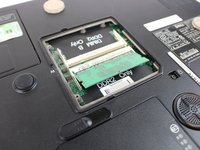
    • Flip the computer over and place it on a clean level surface.

    • Loosen the screws using a #0 Phillips screw driver.

    • It is strongly recommended that the Anti-Static Wrist Strap is used to avoid damage to internal components.

    • The screws are secured by retainer clips in the plastic panel and are not fully removable.

  2. Dell Inspiron 9300 RAM Replacement: passo 2, imagem 1 %32
    • Remove the plastic panel.

  3. Dell Inspiron 9300 RAM Replacement: passo 3, imagem 1 %32 Dell Inspiron 9300 RAM Replacement: passo 3, imagem 2 %32
    Ferramenta utilizada neste passo:
    Heavy-Duty Spudger
    $4.99
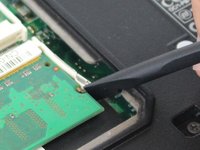
    • Carefully pry away the retaining clips on either side of the ram modules using a spudger tool, until the card pops away from the motherboard.

    • Repeat for the second ram module if necessary.

  4. Dell Inspiron 9300 RAM Replacement: passo 4, imagem 1 %32
    • Carefully pull the ram modules out of it's slot, away from the motherboard.

Conclusão

To reassemble your device, follow these instructions in reverse order.

Uma outra pessoa concluiu este guia.

Randy McMillan

Membro desde: 09/21/16

738 Reputação

Autoria de 4 guias

Equipe

Master Techs Membro de Master Techs

Community

332 Membros

Autoria de 1.473 guias

0Comentários do guia

Comentar

Visualizações:

Últimas 24 horas: 0

Últimos 7 dias: 5

Últimos 30 dias: 13

Ao todo: 510