Ir para o conteúdo principal
Participe da comunidade de reparos - Criar conta

Dell Inspiron 1546 Memory Module Replacement

    • WARNING: Before working inside your computer, read the safety information that shipped with your computer. Follow the procedures in Before You Begin.

    • CAUTION: To avoid electrostatic discharge, ground yourself by using a wrist grounding strap or by periodically touching an unpainted metal surface (such as a connector on your computer).

    • CAUTION: To prevent damage to the memory module connector, do not use tools to spread the memory module securing clips.

  1. Dell Inspiron 1546 Memory Module Replacement, Popping up the Memory Module: passo 2, imagem 1 %32
    • Use your fingertips to carefully spread apart the securing clips on each end of the memory module connector until the module pops up.

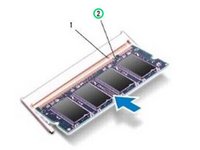
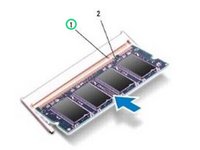
  2. Dell Inspiron 1546 Memory Module Replacement, Align the Notch: passo 3, imagem 1 %32 Dell Inspiron 1546 Memory Module Replacement, Align the Notch: passo 3, imagem 2 %32
    • Align the notch in the NEW memory module with the tab in the memory module connector.

  3. Dell Inspiron 1546 Memory Module Replacement, Sliding the Module: passo 4, imagem 1 %32
    • Slide the memory module firmly into the slot at a 45-degree angle, and press the memory module down until it clicks into place. If you do not hear the click, remove the memory module and reinstall it.

    • NOTE: If the memory module is not installed properly, the computer may not boot.

Linha de Chegada

Terrence15

Membro desde: 12/18/17

79.930 Reputação

Autoria de 441 guias

Equipe

RampUP America, Inc. Membro de RampUP America, Inc.

Community

44 Membros

Autoria de 1.997 guias

0Comentários do guia

Comentar

Visualizações:

Últimas 24 horas: 1

Últimos 7 dias: 3

Últimos 30 dias: 12

Ao todo: 147