Ir para o conteúdo principal
Participe da comunidade de reparos - Criar conta

Craig Electronics CMP773 Volume/Power Control Button Replacement

O que você precisa

  1. Craig Electronics CMP773 Volume/Power Control Button Replacement, Volume/Power Control Button: passo 1, imagem 1 %32
    • Remove the two 3.2 mm PH000 screws near the charging port.

    Pergunte ao FixBot

    Comentar

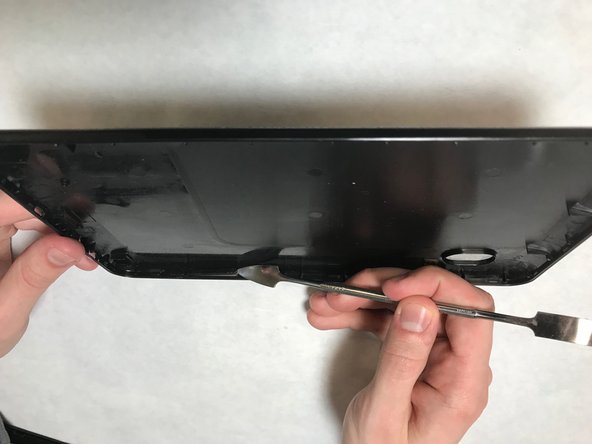
  2. Craig Electronics CMP773 Volume/Power Control Button Replacement: passo 2, imagem 1 %32
    • Pry the back cover from the device along bottom edge.

    Pergunte ao FixBot

    Comentar

  3. Craig Electronics CMP773 Volume/Power Control Button Replacement: passo 3, imagem 1 %32
    • Continue prying along each edge of the device until back cover is free.

    Pergunte ao FixBot

    Comentar

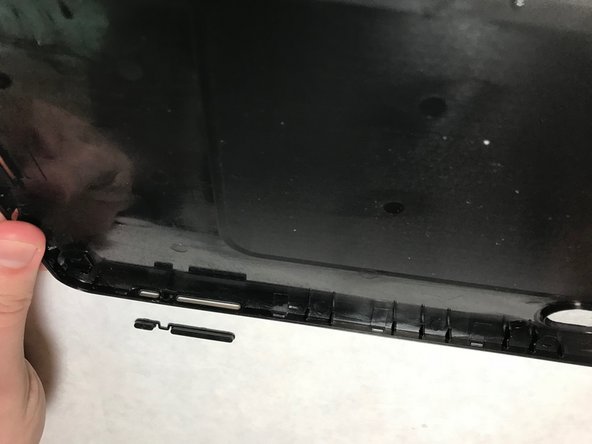
  4. Craig Electronics CMP773 Volume/Power Control Button Replacement: passo 4, imagem 1 %32
    • On the back cover, find the location where the volume/power button is held.

    • The volume/power button is not held securely after back is removed so it may fall out of place while removing the back cover from the device.

    Pergunte ao FixBot

    Comentar

  5. Craig Electronics CMP773 Volume/Power Control Button Replacement: passo 5, imagem 1 %32 Craig Electronics CMP773 Volume/Power Control Button Replacement: passo 5, imagem 2 %32
    • Remove the old button and replace it with the new one.

    Pergunte ao FixBot

    Comentar

Conclusão

Once the above steps have been successfully competed, power on the device. Enjoy your newly replaced volume/power control button.

Cancelar: não concluí este guia.

Jessie L Morris

Membro desde: 03/26/18

171 Reputação

Autoria de 1 guia

Equipe

IUPUI, Team S1-G5, Harley Spring 2018 Membro de IUPUI, Team S1-G5, Harley Spring 2018

IUPUI-HARLEY-S18S1G5

6 Membros

Autoria de 6 guias

0Comentários do guia

Comentar

Visualizações:

Últimas 24 horas: 2

Últimos 7 dias: 9

Últimos 30 dias: 22

Ao todo: 463