Ir para o conteúdo principal
Participe da comunidade de reparos - Criar conta

Conair Infiniti Pro Model 259NP On/Off Button Replacement

Visualizações: 9,4 mil

Visualizar Estatísticas:

Últimas 24 horas:
3
Últimos 7 dias:
26
Últimos 30 dias:
117
Ao todo:
9.417
Comentários: 0

Ninguém deixou comentários sobre este guia. Você será o primeiro?

Go to guide comments
Concluído: 3

3 pessoas marcaram este guia como "concluído". Será você o próximo?

Favorites: 0

Ninguém favoritou (e se inscreveu) neste guia como favorito. Você será o primeiro?

Tempo necessário: 20 - 30 minutos
Dificuldade: Difícil
Faltando Passos

Oops! Este guia está atualmente faltando um ou mais passos importantes.

Conair Infiniti Pro Model 259NP On/Off Button Replacement

Introdução

Ir para o passo 1 ↓

For sticky on/off buttons, you may only need to clean the button. This guide will show you how to fully remove and replace the button.

Note: This guide requires soldering skills. If you don't know how to solder or want to brush up on your skills check out this handy tutorial.

O que você precisa

Ferramentas

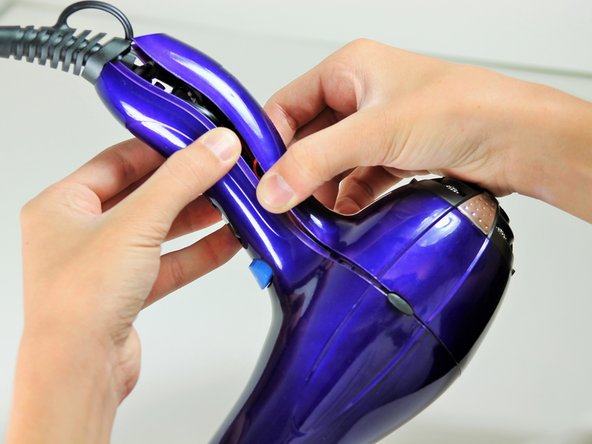
    1. Conair Infiniti Pro Model 259NP On/Off Button Replacement, Back Panel: passo 1, imagem 1 %32
      • Caution: Unplug the hair dryer before attempting this guide. Leaving the device plugged in may result in electrocution and damage to the device.

      • Hold the hair dryer by the handle so that the back panel faces up.

      Pergunte ao FixBot

      Comentar

    2. Conair Infiniti Pro Model 259NP On/Off Button Replacement: passo 2, imagem 1 %32 Conair Infiniti Pro Model 259NP On/Off Button Replacement: passo 2, imagem 2 %32
      • Remove the two 15.875 mm Phillips #2 screws from the back panel.

      Pergunte ao FixBot

      Comentar

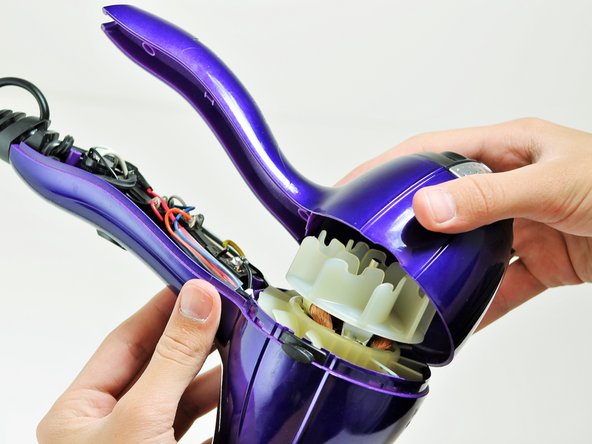
    3. Conair Infiniti Pro Model 259NP On/Off Button Replacement: passo 3, imagem 1 %32 Conair Infiniti Pro Model 259NP On/Off Button Replacement: passo 3, imagem 2 %32 Conair Infiniti Pro Model 259NP On/Off Button Replacement: passo 3, imagem 3 %32
      • Starting from where the cord attaches to the handle, pull apart the two plastic panels.

      • Continue separating the back panel, working along the seam.

      • With moderate force, completely remove the back panel from the hair dryer.

      Pergunte ao FixBot

      Comentar

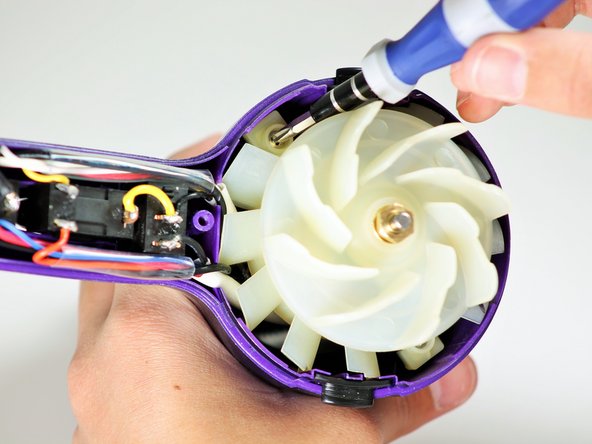
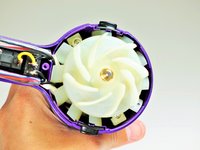
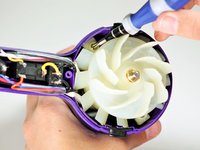
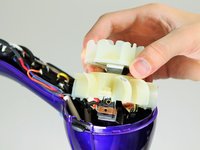
    1. Conair Infiniti Pro Model 259NP On/Off Button Replacement, Fan Motor Assembly: passo 4, imagem 1 %32 Conair Infiniti Pro Model 259NP On/Off Button Replacement, Fan Motor Assembly: passo 4, imagem 2 %32
      • Hold the hair dryer by the nozzle so that the handle points to the left.

      • Remove the two 1-inch Phillips #2 screws from the back of the fan motor.

      Pergunte ao FixBot

      Comentar

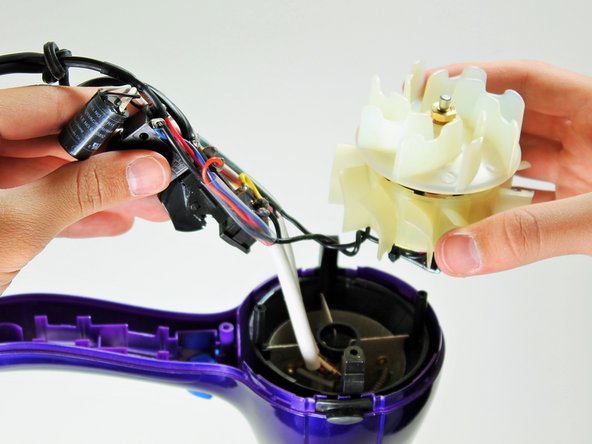
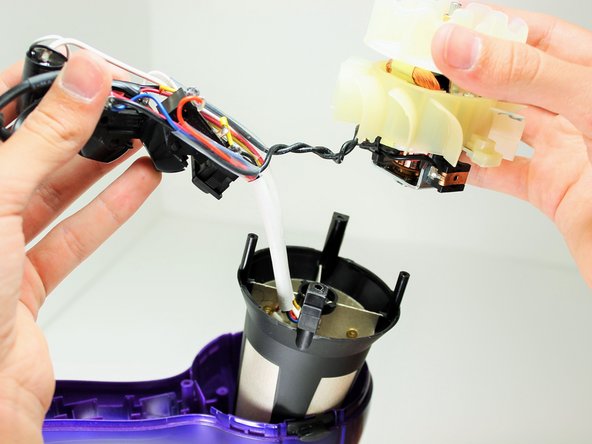
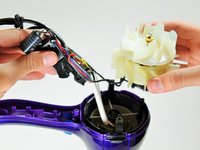
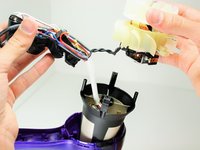
    2. Conair Infiniti Pro Model 259NP On/Off Button Replacement: passo 5, imagem 1 %32 Conair Infiniti Pro Model 259NP On/Off Button Replacement: passo 5, imagem 2 %32 Conair Infiniti Pro Model 259NP On/Off Button Replacement: passo 5, imagem 3 %32
      • Caution: If you recently used the hair dryer, wait at least 10 minutes before attempting this step. The heating element may still be very hot and can cause serious burns.

      • Pull on the back of the fan motor to gently lift the motor out of the hair dryer.

      • Lift the attached electrical wiring and heat shield completely out of the hair dryer.

      Pergunte ao FixBot

      Comentar

    1. Conair Infiniti Pro Model 259NP On/Off Button Replacement, On/Off Button: passo 6, imagem 1 %32
      • Caution: Do not attempt to open or tamper with the capacitor. You may suffer severe electrical shocks.

      • Hold the electrical switches so that the wires are facing upwards.

      Pergunte ao FixBot

      Comentar

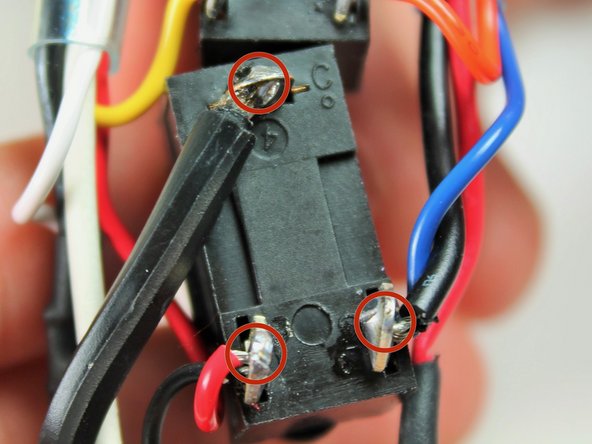
    2. Conair Infiniti Pro Model 259NP On/Off Button Replacement: passo 7, imagem 1 %32
      • Focus on the button directly next to the cylindrical capacitor.

      • Desolder the button at the circled locations.

      • New line.

      Pergunte ao FixBot

      Comentar

Conclusão

To reassemble your device, follow these instructions in reverse order.

Cancelar: não concluí este guia.

3 outras pessoas executaram este guia.

Timothy Lo

Membro desde: 04/22/14

1.214 Reputação

Autoria de 7 guias

Equipe

Cal Poly, Team 10-58, Amido Spring 2014 Membro de Cal Poly, Team 10-58, Amido Spring 2014

CPSU-AMIDO-S14S10G58

4 Membros

Autoria de 84 guias

0Comentários do guia

Comentar

Visualizações:

Últimas 24 horas: 3

Últimos 7 dias: 26

Últimos 30 dias: 117

Ao todo: 9,417