Ir para o conteúdo principal
Participe da comunidade de reparos - Criar conta

ClickN Kids Tablet Speaker Replacement

O que você precisa

    1. ClickN Kids Tablet Speaker Replacement, Speaker: passo 1, imagem 1 %32
      Pergunte ao FixBot

      Comentar

    2. ClickN Kids Tablet Speaker Replacement: passo 2, imagem 1 %32
      • Have someone who knows how to solder to do this step.

      • Be careful not to damage the motherboard or other parts in the device.

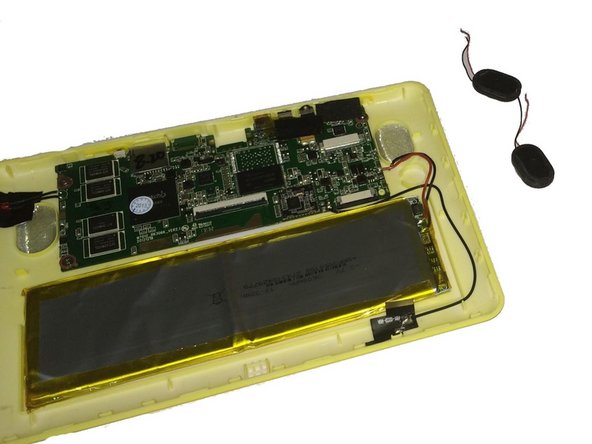
      • Desolder the wires connecting the speakers to the motherboard from the contact points on the motherboard.

      Pergunte ao FixBot

      Comentar

    3. ClickN Kids Tablet Speaker Replacement: passo 3, imagem 1 %32
      • The speaker is held down with a strong adhesive.

      • Pry the first speaker out of its holding place with a plastic opening tool or spudger.

      Pergunte ao FixBot

      Comentar

    4. ClickN Kids Tablet Speaker Replacement: passo 4, imagem 1 %32 ClickN Kids Tablet Speaker Replacement: passo 4, imagem 2 %32
      • Pry the second speaker out of its holding place with a plastic opening tool or spudger.

      Pergunte ao FixBot

      Comentar

Conclusão

To reassemble your device, follow these instructions in reverse order.

Cancelar: não concluí este guia.

Kevin Finney

Membro desde: 03/22/15

562 Reputação

Autoria de 4 guias

Equipe

Baylor, Team 4-4, Williams Spring 2015 Membro de Baylor, Team 4-4, Williams Spring 2015

BU-WILLIAMS-S15S4G4

3 Membros

Autoria de 8 guias

0Comentários do guia

Comentar

Visualizações:

Últimas 24 horas: 1

Últimos 7 dias: 8

Últimos 30 dias: 21

Ao todo: 796