Essa tradução foi gerada por um programa e ainda não foi revisada por uma pessoa. Falas essa língua? Dá uma olhada.
Introdução
Se a tela LCD da sua Canon Powershot Pro1 estiver danificada, siga este guia. A tela LCD oferece ao membro vários recursos, como a capacidade de visualizar fotos e alterar configurações. Se a sua tela LCD estiver danificada, as suas imagens podem aparecer distorcidas. Nesse caso, é importante substituir a sua tela LCD. Certifique-se de usar ferramentas antiestáticas e remover a bateria antes da desmontagem. Além disso, tenha cuidado ao remover os cabos. Eles são essenciais para o funcionamento da tela LCD.
O que você precisa
-
-
-
Localize a tampa do compartimento da bateria no lado direito da câmera. A tampa apresenta o texto: “CF/BATT.OPEN”.
 Pergunte ao FixBot
-
-
-
Há uma seta ao lado do texto. Com as mãos, deslize a tampa na direção desta seta.
-
-
-
Puxe a tampa em sua direção. Após fazer isso, você verá a bateria dentro do compartimento.
-
-
-
-
Pressione a trava laranja da bateria dentro do compartimento.
-
Remova a bateria.
-
-
-
-
-
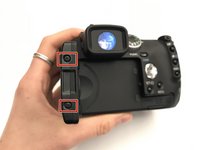
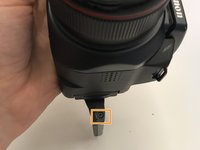
Remova os parafusos Phillips #0 de 1,2 mm nos lados esquerdo e direito do LCD.
-
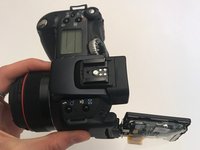
Com a chave Phillips #000, remova os parafusos do lado direito (você precisará girar a tela para acessar os parafusos à direita, e verá um em cada canto).
-
-
-
Remova a capa traseira da tela LCD (que contém a inscrição “Canon”).
-
-
Ferramenta utilizada neste passo:Tweezers$4.99
-
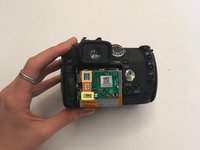
Agora você verá uma placa de circuito exposta e a parte de trás da tela LCD.
-
Dobre a cobertura plástica e remova os cabos planos destacados com uma pinça.
-
-
-
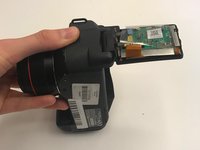
Use a espátula de nylon para desencaixar o LCD da tampa da tela.
-
Agora você pode separar o LCD da câmera.
-





Para a remontagem de seu dispositivo, siga estas instruções na ordem inversa.

Equipe

University of Alabama, Team S1-G1, Bedsole Fall 2019 Membro de University of Alabama, Team S1-G1, Bedsole Fall 2019
UA-BEDSOLE-F19S1G1
3 Membros
Autoria de 60 guias
1Comentário do guia
Hi, where do I get a replacement lcd screen for this is camera?
