Introdução
Removing the LCD screen for replacement.
O que você precisa
-
-
-
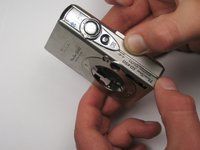
Unscrew the six screws on the casing. Two are on the bottom as pictured; two more are on each side of the camera.
 Pergunte ao FixBot
-
-
-
Pull the lanyard mount off of the camera using a spudger or your fingers.
-
-
-
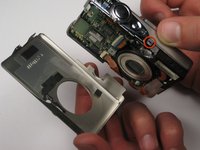
Find the line that separates the casing into its two halves. Hold each half separately, and gently pull apart.
-
Note that there is a small metal clip holding the two halves together. It might help to press down on the back half (indicated) while pulling upward slightly on the front half.
-
-
-
Take hold of the inside of the camera, and gently pull away from the back casing.
-
-
-
-
Remove the square, clear, rubber protector from the front of the logic board. This is not necessary to remove, but can easily fall off and get lost during later steps.
-
-
-
When you reassemble the camera, make sure the switch on the casing matches the position of the switch on the camera internals.
-
The black viewfinder padding can easily fall off the casing. Make sure you don't lose it when moving around parts.
-
-
-
-
-
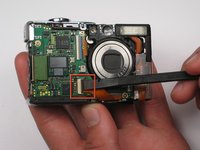
Pull the retaining clip up with the spudger or your finger and remove the ribbon from the socket.
-
-
-
Remove the tripod mount screw.
-
Turn the camera around so that the screen is facing you, and the camera is upright.
-
-
-
Remove the last screw holding the tripod mount to the case. The LCD ribbon threads under the mount, so upon reinstallation, the ribbon will need to be threaded through before the mount is reattached. Take note of the tripod mount orientation.
-
-
-
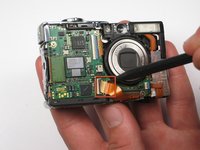
Pull the back light ribbon from it's socket to remove the LCD completely. There is a little hole you can stick the spudger into to help release the ribbon.
-
-






To reassemble your device, follow these instructions in reverse order.
Cancelar: não concluí este guia.
4 outras pessoas executaram este guia.

Equipe

Cal Poly, Team 25-85, Amido Spring 2010 Membro de Cal Poly, Team 25-85, Amido Spring 2010
CPSU-AMIDO-S10S25G85
4 Membros
Autoria de 10 guias
3Comentários do guia
Followed the steps and replaced the broken screen. Now I get only a white screen when turning the camera on. It does take pictures but it won't show anything but a little red dotted arrow on the right hand side over the white screen. Do you have a clue of what is happening?
Salve, dove posso acquistare un display?
Salve, sapreste dirmi dove posso acquistare un display?
