Essa tradução foi gerada por um programa e ainda não foi revisada por uma pessoa. Falas essa língua? Dá uma olhada.
Introdução
Utilize este guia para remover a bateria e substituí-la, caso seja necessário. Faça isso antes de realizar qualquer outro trabalho na câmera.
O que você precisa
-
-
-
Coloque a câmera com o visor LCD voltado para cima e pressione a tampa da bateria.
-
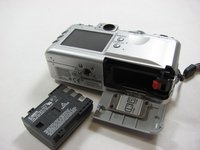
Deixe-a abrir até conseguir ver a bateria no interior.
 Pergunte ao FixBot
-
-
-
-
Pressione o plástico laranja.
-
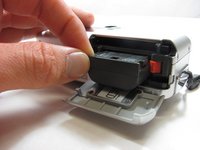
Isso ejetará suavemente a bateria do seu compartimento.
-
-
-
Segurando pelas bordas, deslize a bateria para fora.
-
-


Para a remontagem de seu dispositivo, siga estas instruções na ordem inversa.

Equipe

Cal Poly, Team 7-34, Maness Spring 2012 Membro de Cal Poly, Team 7-34, Maness Spring 2012
CPSU-MANESS-S12S7G34
5 Membros
Autoria de 71 guias
