Ir para o conteúdo principal
Participe da comunidade de reparos - Criar conta

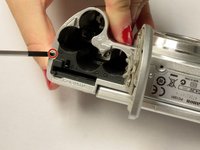
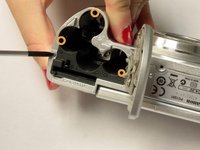
Canon PowerShot A630 Trigger Button Replacement

O que você precisa

  1. Canon PowerShot A630 Trigger Button Replacement, Front Panel: passo 1, imagem 1 %32 Canon PowerShot A630 Trigger Button Replacement, Front Panel: passo 1, imagem 2 %32
    • Open the battery door by sliding the tab on the battery door while pushing the battery door away from the camera.

    • Remove batteries.

    Pergunte ao FixBot

    Comentar

  2. Canon PowerShot A630 Trigger Button Replacement: passo 2, imagem 1 %32 Canon PowerShot A630 Trigger Button Replacement: passo 2, imagem 2 %32
    • Remove the three indicated .2mm screws using a Phillips #00 screwdriver.

    • Gently pull off side-panel to remove it.

    Pergunte ao FixBot

    Comentar

  3. Canon PowerShot A630 Trigger Button Replacement: passo 3, imagem 1 %32
    • Remove the two indicated .2mm screws using a Phillips #00 screwdriver.

    Pergunte ao FixBot

    Comentar

  4. Canon PowerShot A630 Trigger Button Replacement: passo 4, imagem 1 %32 Canon PowerShot A630 Trigger Button Replacement: passo 4, imagem 2 %32
    • Remove the indicated .2mm screw using a Phillips #00 screwdriver.

    • Remove the three .2mm screws located on the internal side of the top panel within the battery chamber using a Phillips #00 screwdriver.

    Pergunte ao FixBot

    Comentar

  5. Canon PowerShot A630 Trigger Button Replacement: passo 5, imagem 1 %32 Canon PowerShot A630 Trigger Button Replacement: passo 5, imagem 2 %32
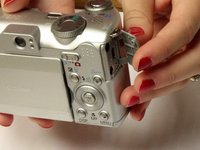
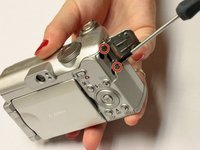
    • Open 'DIGITAL A/V OUT' door on camera.

    • Remove the two indicated .2mm screws using a Phillips #00 screwdriver.

    Pergunte ao FixBot

    Comentar

  6. Canon PowerShot A630 Trigger Button Replacement: passo 6, imagem 1 %32
    • Grip the sides of the top panel and gently pull to separate the top panel from the camera body.

    • The top panel will not completely detach.

    Pergunte ao FixBot

    Comentar

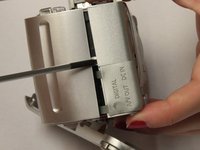
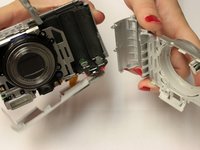
  7. Canon PowerShot A630 Trigger Button Replacement: passo 7, imagem 1 %32 Canon PowerShot A630 Trigger Button Replacement: passo 7, imagem 2 %32
    • Gently pull the front and back panels apart, and use a Phillips #00 screwdriver to remove the screw connecting the panels.

    • Gripping the top and bottom, gently pull the front panel away from the camera body to remove it.

    Pergunte ao FixBot

    Comentar

  8. Canon PowerShot A630 Trigger Button Replacement, Trigger Button: passo 8, imagem 1 %32
    • Use the spudger to gently pull back the retaining clip and pull the ribbon out

    • The top panel should now be completely detached from the camera

    • Applying to much force to the spudger may damage the retaining clip

    Pergunte ao FixBot

    Comentar

  9. Canon PowerShot A630 Trigger Button Replacement: passo 9, imagem 1 %32
    • Remove the two screws holding down the metal frame using the Phillips #00 screwdriver

    Pergunte ao FixBot

    Comentar

  10. Canon PowerShot A630 Trigger Button Replacement: passo 10, imagem 1 %32
    • Lift up the metal frame to expose the two screws located under the trigger button.

    • Remove the two screws using Phillips #00 screwdriver

    Pergunte ao FixBot

    Comentar

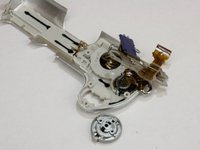
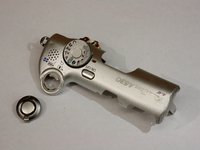
  11. Canon PowerShot A630 Trigger Button Replacement: passo 11, imagem 1 %32 Canon PowerShot A630 Trigger Button Replacement: passo 11, imagem 2 %32
    • Trigger button should fall out

    Pergunte ao FixBot

    Comentar

Conclusão

To reassemble your device, follow these instructions in reverse order.

Cancelar: não concluí este guia.

Uma outra pessoa concluiu este guia.

Kelly Duggan

Membro desde: 10/13/14

460 Reputação

Autoria de 3 guias

Equipe

Clemson, Team 2-5, Benson Fall 2014 Membro de Clemson, Team 2-5, Benson Fall 2014

CLEM-BENSON-F14S2G5

4 Membros

Autoria de 18 guias

0Comentários do guia

Comentar

Visualizações:

Últimas 24 horas: 2

Últimos 7 dias: 8

Últimos 30 dias: 37

Ao todo: 1,010