Ir para o conteúdo principal
Participe da comunidade de reparos - Criar conta

Canon PowerShot A540 SD Card Reader Replacement

O que você precisa

  1. Canon PowerShot A540 SD Card Reader Replacement, Back Cover: passo 1, imagem 1 %32 Canon PowerShot A540 SD Card Reader Replacement, Back Cover: passo 1, imagem 2 %32
    • Turn off the camera.

    • Turn the camera upside-down and press the tab to release the battery cover. Remove the batteries.

    Pergunte ao FixBot
  2. Canon PowerShot A540 SD Card Reader Replacement: passo 2, imagem 1 %32
    • Turn the camera upside down to view the "Card/Batt. Open" Cover.

    • Use a Phillips head #000 screwdriver to remove the three (3) 4.0 mm screws.

    Pergunte ao FixBot
  3. Canon PowerShot A540 SD Card Reader Replacement: passo 3, imagem 1 %32
    • Open "Card/Batt. Open" Cover.

    • Remove the one (1) 5.0 mm screw with the Phillips head #000 screwdriver.

    Pergunte ao FixBot
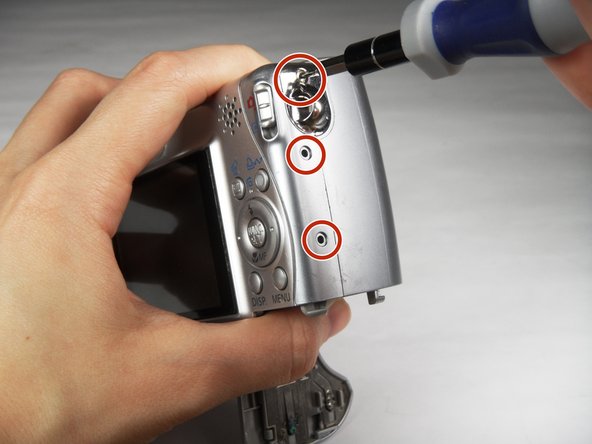
  4. Canon PowerShot A540 SD Card Reader Replacement: passo 4, imagem 1 %32
    • Turn the camera to the right side of the LCD screen.

    • Remove the three (3) 4.0 mm screws with the Phillips head #000 screwdriver.

    Pergunte ao FixBot
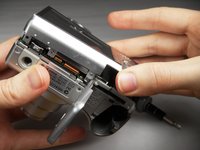
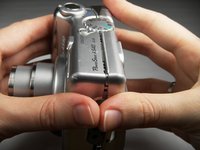
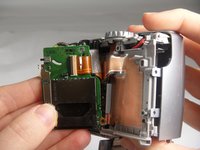
  5. Canon PowerShot A540 SD Card Reader Replacement: passo 5, imagem 1 %32 Canon PowerShot A540 SD Card Reader Replacement: passo 5, imagem 2 %32 Canon PowerShot A540 SD Card Reader Replacement: passo 5, imagem 3 %32
    • Gently remove the back cover.

    • Start at the bottom at the corner of the "Card/Batt. Open" Cover.

    • Then move onto the other edges and the top.

    • It may be tight at the top!

    Pergunte ao FixBot
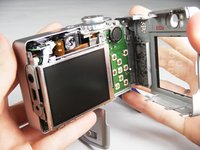
  6. Canon PowerShot A540 SD Card Reader Replacement, SD Card Reader: passo 6, imagem 1 %32 Canon PowerShot A540 SD Card Reader Replacement, SD Card Reader: passo 6, imagem 2 %32
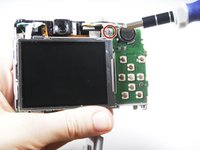
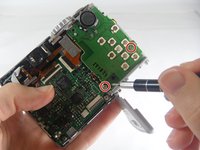
    • Turn the camera to view the back.

    • Remove the one (1) 3.0 mm screw on the top right corner of the screen.

    • There is a small metal bar that rests on this frame. Keep it with the screws that have been removed from the camera.

    Pergunte ao FixBot
  7. Canon PowerShot A540 SD Card Reader Replacement: passo 7, imagem 1 %32 Canon PowerShot A540 SD Card Reader Replacement: passo 7, imagem 2 %32
    Ferramenta utilizada neste passo:
    Tweezers
    $4.99
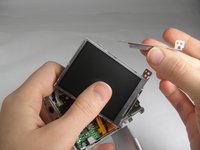
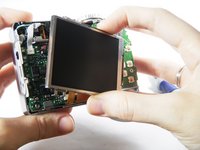
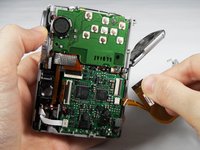
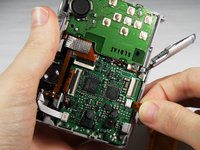
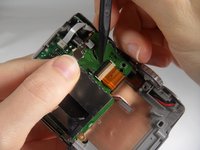
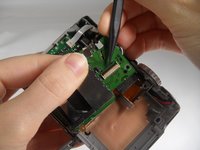
    • Lift the LCD Screen off of the back to view the attached ribbon cables.

    • Use tweezers to flip the black bar up.

    Pergunte ao FixBot
  8. Canon PowerShot A540 SD Card Reader Replacement: passo 8, imagem 1 %32 Canon PowerShot A540 SD Card Reader Replacement: passo 8, imagem 2 %32 Canon PowerShot A540 SD Card Reader Replacement: passo 8, imagem 3 %32
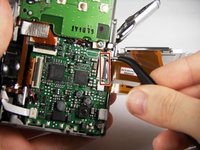
    • Gently pull the big ribbon out.

    • Gently pull the small ribbon out.

    • The small ribbon does not have a bar like the big ribbon.

    Pergunte ao FixBot
  9. Canon PowerShot A540 SD Card Reader Replacement: passo 9, imagem 1 %32 Canon PowerShot A540 SD Card Reader Replacement: passo 9, imagem 2 %32
    • Remove the two (2) 3.0 mm screws shown with the Phillips head #000 screwdriver.

    Pergunte ao FixBot
  10. Canon PowerShot A540 SD Card Reader Replacement: passo 10, imagem 1 %32 Canon PowerShot A540 SD Card Reader Replacement: passo 10, imagem 2 %32
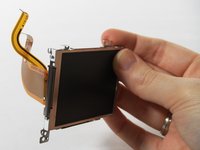
    • Remove the ribbon from the clamp/bar securing it by using your tweezers to pull the bar up.

    Pergunte ao FixBot
  11. Canon PowerShot A540 SD Card Reader Replacement: passo 11, imagem 1 %32
    • Remove the SD Card reader and replace.

    • There is another metal bar that comes off of the SD Card reader when screws are removed.

    Pergunte ao FixBot
Conclusão

To reassemble your device, follow these instructions in reverse order.

2 outras pessoas executaram este guia.

Cooper Hale

Membro desde: 03/22/15

598 Reputação

Autoria de 3 guias

Equipe

Baylor, Team 7-12, Williams Spring 2015 Membro de Baylor, Team 7-12, Williams Spring 2015

BU-WILLIAMS-S15S7G12

3 Membros

Autoria de 20 guias

1Comentário do guia

Hello, does anyone have a replacement Part Number for this SD Card Board? I have multiple A540 cameras that have a faulty sd card board and I am looking for any replacements.

Juan - Responder Compartilhar

Comentar

Visualizações:

Últimas 24 horas: 0

Últimos 7 dias: 7

Últimos 30 dias: 48

Ao todo: 1,822