Essa tradução foi gerada por um programa e ainda não foi revisada por uma pessoa. Falas essa língua? Dá uma olhada.
Introdução
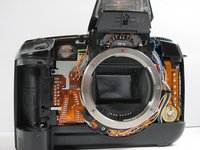
O disco de controle da Canon EOS A2 encontra-se abaixo da tampa superior do dispositivo. A tampa dianteira também deve ser removida para acessar essa peça.
O que você precisa
-
-
-
Localize a tampa da bateria/empunhadura da câmera no lado esquerdo da câmera e levante a aba giratória de remoção.
 Pergunte ao FixBot
-
-
-
Gire a aba no sentido horário para destravar a porta e, em seguida, puxe-a para fora da câmera para removê-la.
-
-
-
Retire a bateria de dentro do compartimento da bateria e coloque a tampa de lado.
-
-
-
-
-
Remova os dois parafusos de 6,4 mm acima da abertura da lente usando uma chave Phillips #00.
-
-
-
Remova o parafuso de 6,4 mm do interior do bisel da câmera.
-
-
-
Vire a câmera de cabeça para baixo e remova o parafuso de 5,4 mm abaixo do bisel da câmera na parte frontal do dispositivo.
-
-
-
-
Remova os parafusos de 5,6 mm atrás da tampa da bateria.
-
-
-
Remova os dois parafusos de 6,4 mm do mecanismo de trava no lado direito da câmera.
-
-
-
Remova o parafuso de 6,4 mm na parte superior da borda interna do compartimento da bateria.
-
-
-
-
-
Remova o parafuso de 4,3 mm abaixo da argola da alça da câmera.
-
-
-
Remova os dois parafusos de 4,8 mm localizados em ambos os lados da ocular.
-
-
-
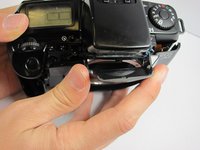
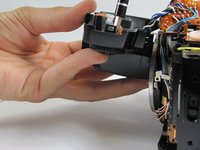
Após expor o cabo plano, deixe a tampa superior pendurada suavemente na frente da câmera. Use a Ferramenta de abertura para puxar com cuidado as abas brancas no cabo plano, soltando-o.
-
-
-
-
-
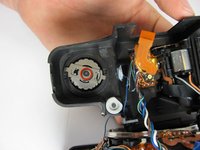
Remova o parafuso de 3 mm da parte traseira do seletor de controle enquanto segura a parte frontal dele.
-
-
-
Na parte inferior do bisel superior, remova o anel, a esfera de retenção e a mola. O seu seletor de controle está agora pronto para ser substituído por uma unidade funcional.
-
-




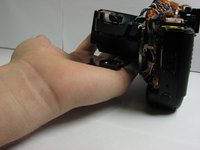

Para a remontagem de seu dispositivo, siga estas instruções na ordem inversa.
Cancelar: não concluí este guia.
7 outras pessoas executaram este guia.

Equipe

Cal Poly, Team 8-9, Regan Spring 2011 Membro de Cal Poly, Team 8-9, Regan Spring 2011
CPSU-REGAN-S11S8G9
4 Membros
Autoria de 72 guias
9Comentários do guia
Is it safe to do this procedure while a film is inside the camera?
I was wondering if anyone could help me were I could possibly get the new parts?
I've looked around but found nothing relevant so far.
Thanks in advance,
Agoston Horanyi
Did you find the parts ? If no go to eBay.
as exemple : https://www.ebay.com/itm/Canon-EOS-A2E-R...
I'm wondering if there is someone who can fix the mode selector for a reasonable price
How can I open the flash to get to the screw that needs to be removed in order to fix the rotary dial when the rotary dial is moving freely and the camera does not turn on?
