Essa tradução foi gerada por um programa e ainda não foi revisada por uma pessoa. Falas essa língua? Dá uma olhada.
Introdução
O painel superior pode ser separado com segurança do corpo da câmera, mas ele permanecerá conectado por vários fios e um cabo plano. Separar o painel superior permite o acesso a vários componentes importantes.
O que você precisa
-
-
-
Remova os dois parafusos pretos de 4,8 mm acima da lente na parte frontal da câmera.
 Pergunte ao FixBot
-
-
-
Remova o parafuso preto de 4,3 mm sob o anel da lente e o parafuso preto de 4,8 mm sob a câmera.
-
-
-
Remova o parafuso preto de 4,8 mm do lado esquerdo da câmera.
-
-
-
-
Remova o painel frontal levantando-o para fora do corpo da câmera.
-
-
-
-
-
Deslize a ocular externa para cima para removê-la.
-
-
-
Remova os dois parafusos pretos de 4,75 mm localizados na parte superior da câmera.
-
-
-
Remova os quatro parafusos pretos de 4,3 mm próximos aos cantos inferiores da ocular na parte traseira da câmera.
-
-
-
Separe lentamente o painel superior da câmera, empurrando-o para cima.
-
-


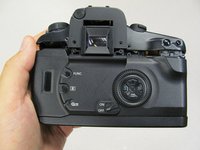
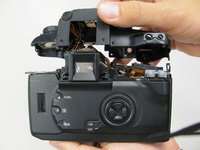
Para a remontagem de seu dispositivo, siga estas instruções na ordem inversa.
Cancelar: não concluí este guia.
Uma outra pessoa concluiu este guia.

Equipe

Cal Poly, Team 8-8, Regan Spring 2011 Membro de Cal Poly, Team 8-8, Regan Spring 2011
CPSU-REGAN-S11S8G8
5 Membros
Autoria de 132 guias
