Ir para o conteúdo principal
Participe da comunidade de reparos - Criar conta

BOSE SoundTouch 30 Display Assembly Replacement

O que você precisa

  1. BOSE SoundTouch 30 Display Assembly Replacement, Base Plate: passo 1, imagem 1 %32 BOSE SoundTouch 30 Display Assembly Replacement, Base Plate: passo 1, imagem 2 %32
    • Remove the four 15.5 mm PH2 screws securing the base plate to the device.

    Pergunte ao FixBot

    Comentar

  2. BOSE SoundTouch 30 Display Assembly Replacement, Display Assembly: passo 2, imagem 1 %32
    • Remove the three 15.5mm PH2 screws holding the front-mesh grille in place.

    Pergunte ao FixBot

    Comentar

  3. BOSE SoundTouch 30 Display Assembly Replacement: passo 3, imagem 1 %32
    • Remove the grille by gripping the edges and pulling upwards.

    • There is a small ribbon cable that connects the display assembly to the body of the device. Make sure to disconnect the cable before pulling the grille all the way off or else the cable could snap.

    Pergunte ao FixBot

    Comentar

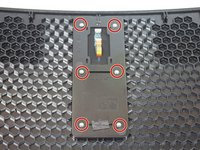
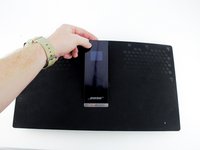
  4. BOSE SoundTouch 30 Display Assembly Replacement: passo 4, imagem 1 %32 BOSE SoundTouch 30 Display Assembly Replacement: passo 4, imagem 2 %32
    • Remove the six 8.9mm T9 torx screws holding the display assembly down.

    • The display assembly can now be lifted out of the grille so that a new one can be put in.

    Pergunte ao FixBot

    Comentar

Conclusão

To reassemble your device, follow these instructions in reverse order.

Cancelar: não concluí este guia.

4 outras pessoas executaram este guia.

Brennen Irey

Membro desde: 04/18/18

1.269 Reputação

Autoria de 6 guias

Equipe

Cal Poly, Team S16-G2, Livingston Spring 2018 Membro de Cal Poly, Team S16-G2, Livingston Spring 2018

CPSU-LIVINGSTON-S18S16G2

4 Membros

Autoria de 8 guias

1Comentário do guia

Display assembly price

imrankhannnnn786 - Responder Compartilhar

Comentar

Visualizações:

Últimas 24 horas: 5

Últimos 7 dias: 27

Últimos 30 dias: 118

Ao todo: 5,280