Ir para o conteúdo principal
Participe da comunidade de reparos - Criar conta

BIOS battery replacement

O que você precisa

  1. BIOS battery replacement, Battery: passo 1, imagem 1 %32 BIOS battery replacement, Battery: passo 1, imagem 2 %32 BIOS battery replacement, Battery: passo 1, imagem 3 %32
    • Unlock the battery latch on the right.

    • Unlock the battery lock on the left.

    • Remove the battery pack from its slot.

    Pergunte ao FixBot
  2. BIOS battery replacement, Access to Components 1: passo 2, imagem 1 %32 BIOS battery replacement, Access to Components 1: passo 2, imagem 2 %32 BIOS battery replacement, Access to Components 1: passo 2, imagem 3 %32
    • Using the Philips # 0 screwdriver, unscrew the 2 screws from the bottom cover.

    • Check the marks indicating the direction in which the cover must be removed.

    • Remove the bottom cover by removing it in the direction of the markers.

    Pergunte ao FixBot
  3. BIOS battery replacement: passo 3, imagem 1 %32
    • HDD hard disk and BIOS stack components appear.

    Pergunte ao FixBot
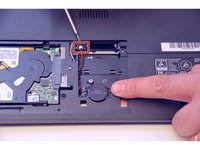
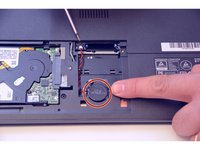
  4. BIOS battery replacement, BIOS battery: passo 4, imagem 1 %32 BIOS battery replacement, BIOS battery: passo 4, imagem 2 %32
    • Remove the battery connector first.

    • Then gently peel off the BIOS stack itself.

    Pergunte ao FixBot
Conclusão

For reassembly, follow the instructions in reverse order.

Um agradecimento especial a esses tradutores:

fr en

100%

Estes tradutores estão nos ajudando a consertar o mundo! Quer contribuir?
Comece a traduzir ›

Felice Suglia

Membro desde: 06/15/13

33.562 Reputação

Autoria de 283 guias

0Comentários do guia

Comentar

Visualizações:

Últimas 24 horas: 3

Últimos 7 dias: 17

Últimos 30 dias: 84

Ao todo: 1,612