Introdução
Upgrade the RAM in your laptop.
O que você precisa
-
Ferramenta utilizada neste passo:T5 Torx Screwdriver$9.99
-
Remove the twelve 3 mm bottom panel screws with a T5 Torx Screwdriver.
 Pergunte ao FixBot
-
-
-
-
Use a plastic opening tool to pry along the perimeter of the bottom panel until it can be easily removed.
-
Remove the bottom panel from the body of the laptop.
-
Set aside the bottom panel.
-
-
-
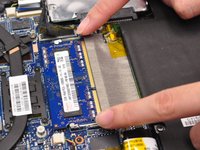
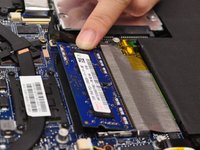
Push away the RAM retaining arms from the RAM chip.
-
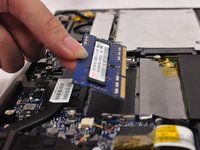
Remove the RAM chip completely.
-


To reassemble your device, follow these instructions in reverse order.
Cancelar: não concluí este guia.
5 outras pessoas executaram este guia.

Equipe

CSU Fullerton, Team 2-2, Bruce Fall 2015 Membro de CSU Fullerton, Team 2-2, Bruce Fall 2015
CSUF-BRUCE-F15S2G2
4 Membros
Autoria de 6 guias
2Comentários do guia
Replaced the 4 GB RAM module in my UX32VD with an 8 GB Timetec Hynix IC DDR3 1600MHz PC3-12800 Non ECC Unbuffered 1.35V CL11 2Rx8 Dual Rank 204 Pin SODIMM Laptop Notebook Computer Memory Ram Module using this guide. It worked like a charm. Thank you for posting the guide!
Worked like a charm on a UX32VD. Installed a "Kingston SO-DDR3L-RAM ValueRAM 1600 MHz 1x 8 GB" in 3min
HUGE DIFFERENCE
Thank you very much!
PS. There was a foil wrapper around the old RAM that I removed and put around the new RAM. Heat dissipation I imagine
