Ir para o conteúdo principal
Participe da comunidade de reparos - Criar conta

Asus X751L Wireless Card Replacement

O que você precisa

  1. Asus X751L Wireless Card Replacement, Keyboard: passo 1, imagem 1 %32
    • With the screen closed, place your laptop upside-down with the front facing you.

    • Remove the six 14.6mm Phillips #00 screws.

    • Remove the four 6.6mm Phillips #00 screws.

    Pergunte ao FixBot

    Comentar

  2. Asus X751L Wireless Card Replacement: passo 2, imagem 1 %32
    • Flip the laptop over and open the lid.

    • Pry around the edges of the laptop base using the plastic opening tool.

    • Prying too hard can break the plastic clips.

    Pergunte ao FixBot

    Comentar

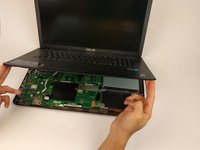
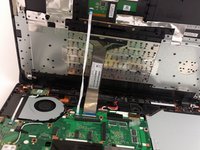
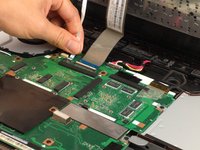
  3. Asus X751L Wireless Card Replacement: passo 3, imagem 1 %32 Asus X751L Wireless Card Replacement: passo 3, imagem 2 %32 Asus X751L Wireless Card Replacement: passo 3, imagem 3 %32
    • Carefully lift the keyboard up.

    • Be very careful when lifting the keyboard up. Two zero insertion force (ZIF) cables are between the keyboard assembly and the motherboard. Do not lift the assembly too high.

    • Disconnect the two ZIF connectors from the motherboard using your fingernail to lift the cream-colored tab.

    Pergunte ao FixBot

    Comentar

  4. Asus X751L Wireless Card Replacement, Wireless Card: passo 4, imagem 1 %32
    • Remove the single 4.7mm PH00 screw holding the wireless card to the motherboard.

    Pergunte ao FixBot

    Comentar

  5. Asus X751L Wireless Card Replacement: passo 5, imagem 1 %32
    • Using your fingers, lightly lift up on the black and white antenna cords.

    Pergunte ao FixBot

    Comentar

  6. Asus X751L Wireless Card Replacement: passo 6, imagem 1 %32
    • With your fingers lightly pull the wireless card out of the slot.

    • Make sure to keep the card parallel with the motherboard when removing from the slot.

    Pergunte ao FixBot

    Comentar

Conclusão

To reassemble your device, follow these instructions in reverse order.

Cancelar: não concluí este guia.

3 outras pessoas executaram este guia.

Equipe

USF Tampa, Team 17-2, Blackwell Spring 2017 Membro de USF Tampa, Team 17-2, Blackwell Spring 2017

USFT-BLACKWELL-S17S17G2

4 Membros

Autoria de 5 guias

1Comentário do guia

I feel the existing WiFi card is not very good. Is there is better one I can get for the Asus X751L?

July 3, 2023.


cookbake2 - Responder Compartilhar

Comentar

Visualizações:

Últimas 24 horas: 1

Últimos 7 dias: 7

Últimos 30 dias: 35

Ao todo: 2,781