Ir para o conteúdo principal
Participe da comunidade de reparos - Criar conta

Asus Transformer T100 Button Module Replacement

O que você precisa

    1. Asus Transformer T100 Button Module Replacement, Rear Cover: passo 1, imagem 1 %32 Asus Transformer T100 Button Module Replacement, Rear Cover: passo 1, imagem 2 %32
      • Separate the tablet from the base by pressing the large silver button below the tablet. The silver button is located at the base of the tablet.

      • Remove the tablet by lifting up.

      Pergunte ao FixBot

      Comentar

    2. Asus Transformer T100 Button Module Replacement: passo 2, imagem 1 %32 Asus Transformer T100 Button Module Replacement: passo 2, imagem 2 %32
      • Insert the opening tool into the seam of the tablet casing and gently pry upwards.

      • With a little force, you will feel the clips release.

      Pergunte ao FixBot

      Comentar

    3. Asus Transformer T100 Button Module Replacement: passo 3, imagem 1 %32
      • Slide the tool along all four edges of the tablet, making sure that all the clips are released.

      • Do not break these clips; otherwise, the screen will become less secure.

      Pergunte ao FixBot

      Comentar

    4. Asus Transformer T100 Button Module Replacement: passo 4, imagem 1 %32 Asus Transformer T100 Button Module Replacement: passo 4, imagem 2 %32
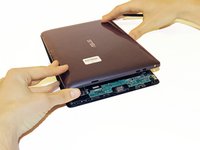
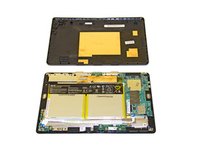
      • Remove the rear casing.

      Pergunte ao FixBot

      Comentar

    1. Asus Transformer T100 Button Module Replacement, Button Module: passo 5, imagem 1 %32
      Ferramenta utilizada neste passo:
      Tweezers
      $4.99
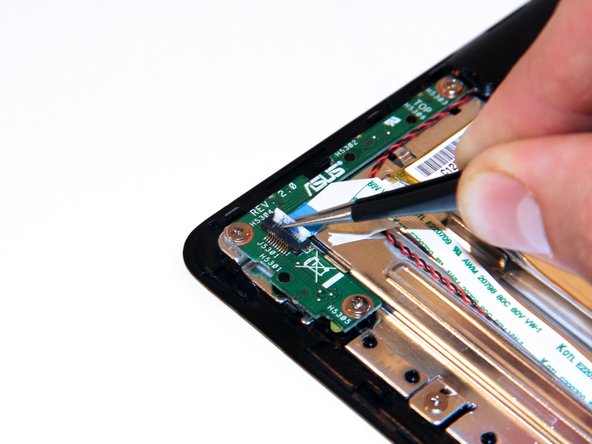
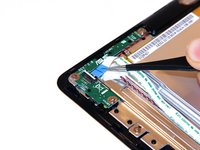
      • Unclip the white connection clip using a pair of tweezers.

      Pergunte ao FixBot

      Comentar

    2. Asus Transformer T100 Button Module Replacement: passo 6, imagem 1 %32 Asus Transformer T100 Button Module Replacement: passo 6, imagem 2 %32
      • Pull the connection apparatus from the connection clip on the board using a pair of tweezers.

      Pergunte ao FixBot

      Comentar

    3. Asus Transformer T100 Button Module Replacement: passo 7, imagem 1 %32
      • Gently fold the connection apparatus back away from your work area.

      Pergunte ao FixBot

      Comentar

    4. Asus Transformer T100 Button Module Replacement: passo 8, imagem 1 %32 Asus Transformer T100 Button Module Replacement: passo 8, imagem 2 %32 Asus Transformer T100 Button Module Replacement: passo 8, imagem 3 %32
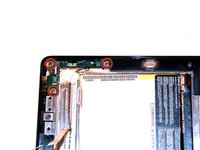
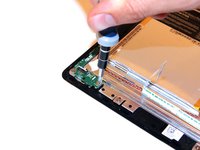
      • Remove the screws using a Phillips Head #1 screwdriver.

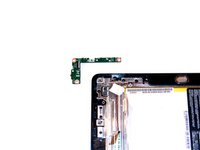
      • Remove the power button module.

      Pergunte ao FixBot

      Comentar

Conclusão

To reassemble your device, follow these instructions in reverse order.

Cancelar: não concluí este guia.

4 outras pessoas executaram este guia.

Taylor Pantiga

Membro desde: 04/14/14

1.629 Reputação

Autoria de 6 guias

Equipe

Cal Poly, Team 13-31, Maness Spring 2014 Membro de Cal Poly, Team 13-31, Maness Spring 2014

CPSU-MANESS-S14S13G31

3 Membros

Autoria de 42 guias

1Comentário do guia

My problem is that when reinstalltng the back cover the button does not fit the button module to press the on/off switch. The switch works allright.

What can i do? At this moment I can only switch the tablet on after removing the back cover.

Rudolf Guys - Responder Compartilhar

Comentar

Visualizações:

Últimas 24 horas: 0

Últimos 7 dias: 12

Últimos 30 dias: 36

Ao todo: 6,583